25 26
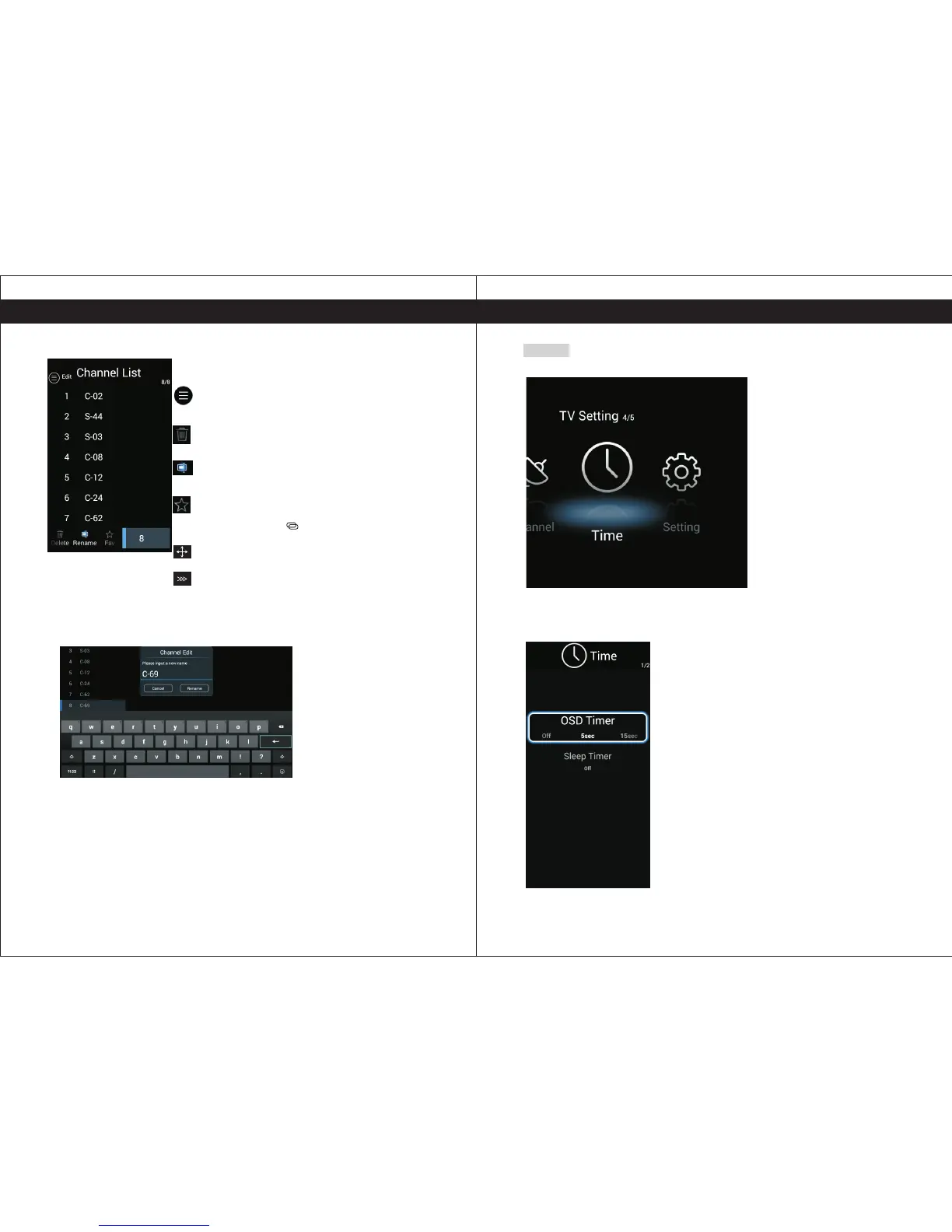
Time
ress P 【 】/【 】to select Time.◄ ►
OSD Timer
Select OSD Timer 【 】/【 】to adjust.
Available OFF, 5sec, 15sec, 30sec
Sleep Timer
Select Sleep Timer 【 】/【 】to adjust.
Available , min, min, min, min, min,
min,
,and ◄ ►
( : )
,and ◄ ►
( :OFF 15 30 45 60 90
120 240min).
Press Enter button to enter the sub-title, and press ◄ ►【 】/【 】to sdjust.
TV SettingsTV Settings
Press to delete the channel.
Press to enter the rename state, then select the word
you want to change, and ▼/▲ /◄/► to select word.
Press the to select Channel List.【 】/【 】◄ ►
Press to Edit the Channel List.
Press to add or delete the favorite channel.
Remark. The favorite channels list can be displayed by
pressing the button " " on the remote control.
Press to skip the select channel.(Your TV set will skip
the channel automatically when using CH+/- to view
the channels.)
Press to move the select channel.


 To Next Page