9Clover Mini Install Guide — EU 1.01
Taking Transactions on Clover Mini
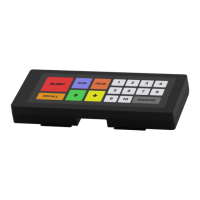
using the PIN entry aid
1. Open the Sale or Register app
2. Enter the sale amount in Sale app or select items in Register app
3. Tap Charge in Sale app
or Pay, then Charge on card in the Register app
4. Insert chip-card, Swipe magnetic strip card,
• For an EMV chip-card payment
• For an NFC-enabled chip-card, Apple Pay, or Android Pay
• For a magnetic swipe payment
5. Tap USE AID button and follow the on-screen instructions to securely
place the aid over the screen and allow the customer to enter their
PIN
6. Remove Aid after payment is completed and the customer removes
their card.
7. Select your receipt option: Print, Email, or Text
8. Tap Done
1234 5678 9012 3456
1234 5678 9012 3456
1234 5678 9012 3456
1234 5678 9012 3456
If verifying signature, the
customer will need to sign
and return the device to an
employee. The employee will
need to verify the signature by
tapping Verify
NOTE
Enter PIN
$10.00
nter PI
12 3
45 6
78 9
00 0
$10.00
8
10.0
Enter PIN
nter PI
$10.00


 To Previous Page