Components
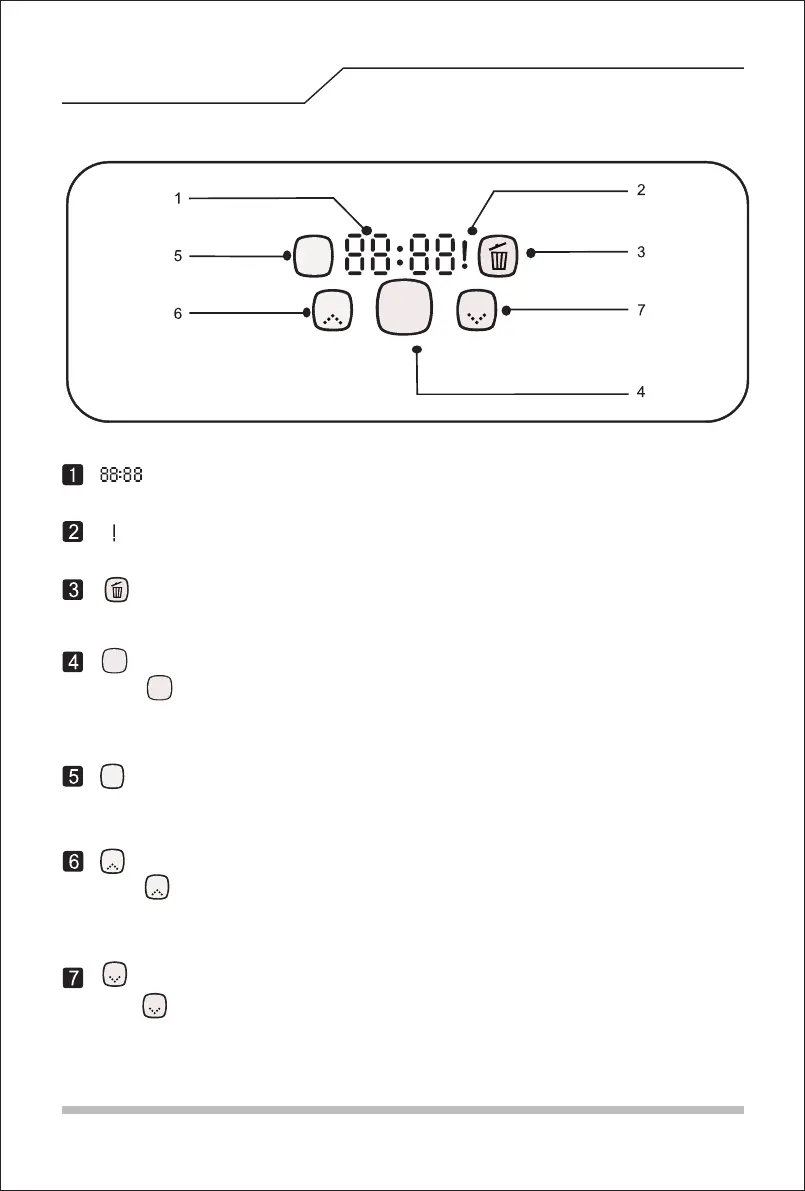
Display time setting, progress, recharging status, and error codes, etc.
Error display.。
“ ””Cleaning button
Press “ ”button for operations below::
A. Switch from sleep mode to selection mode; or switch from selection mode to sleep
mode by pressing on for 3 seconds.
B. Press this button to confirm the cleaning plan made.
“ ””Cleaning plan
A. Press to set cleaning plans under selection mode.
B. Under planning mode, press this button to switch between hour and minute.
C. Under planning mode, press on this button for 5 seconds to cancel planning.
“ ””Spot cleaning
Press “ ””button for operations below:
“ ””
Self-recharging button
Press“ ””button for operations below:
A. Under planning mode, press this button to subtract numbers.
B. Under selection mode, press this button to send the robot to the dock for
self-recharging.
A. Under planning mode, press this button to add numbers.
B. Under selection mode, press this button to start spot cleaning in a spiral pattern.
Panel
“ ”display
“ ”Display
“ ””display
Clean
Spot
Plan
Home
Clean
Clean
Plan
Spot
Spot
Home
Home
Turn constantly on for a full dustbin or a choked suction tunnel. 。
6


 To Next Page