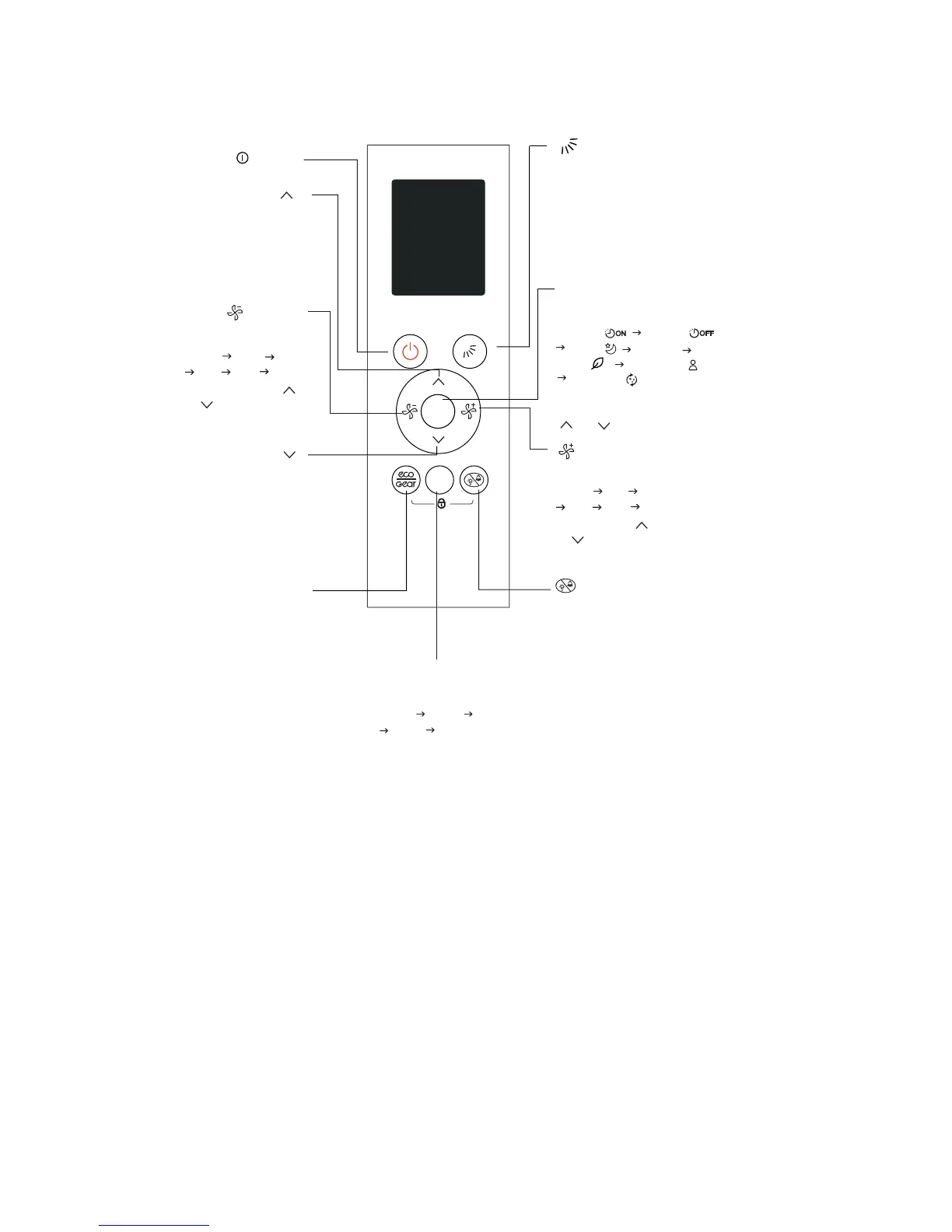
Fig. 2 —Function Buttons
Select fan speeds in
the following order:
AU%
AU%
100%
20%
60%
60%
80%
40%
40%
80%
20%.
100%.
Adjust
Adjust
Press the Adjust
or button to increase
/decrease the fan
speed in 1% increments.
Press Adjust
or to increase/decrease
the fan speed in 1% increments.
ECO/GEAR Button
Starts and stops ECO feature
Press and hold down this
button for 2 seconds to
activate the GEAR function.
Starts and stops the louver
movement.
Press this button, the horizontal
louver swings up and down
automatically. Hold down this
button for 2 seconds, the
vertical louver swings left
and right automatically.
Scrolls through operation
functions as follows:
Turns indoor unit s LED
display and air conditioner
buzzer on and off, which
creates a comfortable and
quiet environment.
Under
this mode, the display
illuminates for 10 seconds
while adjusting the mode, set
temperature or fan speed, etc.
MODE
Scrolls through operation
modes as follows:
Timer on( )
Timer off( )
Sleep( )
Turbo
Self Clean( )
Follow Me ( )
Fresh( )
,
AUT O COOL DR Y
The selected symbol flashes
on the display area, press
or to confirm.
Mode
Increase temperature in
1
°F (0.5°C) per click.
Hold button down to increase
temperature in 1
°F (1°C)
decrements. Max. temperature
is 86
°F (30°C)
Decreases temperature in
1
°F(0.5°C) per click.
Hold down to decrease
temperature in
1°F (1°C) decrements.
Min. temperature is 60°F (16°C)
SET


 To Next Page