32802000102 Specifications subject to change without notice. 7
REMOTE CONTROL FUNCTIONS
Pressing ON/OFF
When the air conditioner is not in operation, the remote control
displays the last set point and mode.
•Press ON/OFF to start the unit.
- The unit starts in the last operating mode and set point. The
ON/OFF indicator appears.
•Press ON/OFF to stop the unit.
- All the indicator lights on the unit go out, and the remote
control displays the set point and mode.
NOTE: If ON/OFF is pressed too soon after a stop, the
compressor will not start for 3 to 4 minutes due to the
inherent protection against frequent compressor cycling.
The unit only emits an audible beep when the signals are
received correctly.
Selecting an Operating Mode
Use OPERATING MODE to select one of the available modes.
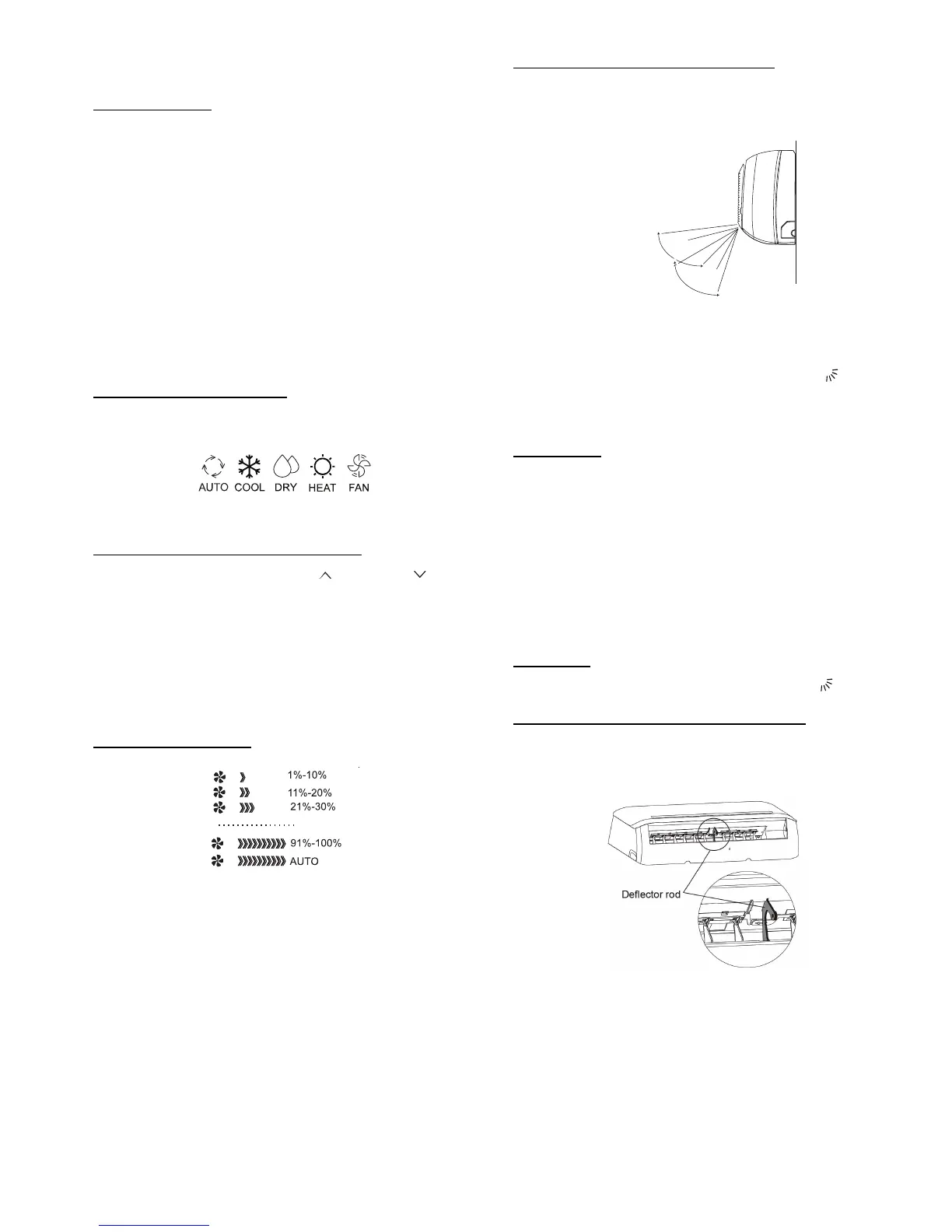
Fig. 6 —Display
Setting the Room Temperature Set Point
Press the increase temperature set point and decrease buttons
to raise or lower the temperature.The unit confirms the signal receipt
with a beep and the value of the set temperature appears on the
display and changes accordingly. The temperature can be set
between 62°F (17°C) and 86°F (30°C) in increments of 1°F or 1°C.
NOTE: In the COOLING mode, if the temperature
selected is higher than the room temperature, the unit will
not start. The same applies for the HEATING mode if the
selected temperature is lower than the room temperature.
Selecting the Fan Speed
Fig. 7 —Fan Speeds
The fan speed can be selected by pressing FAN.
NOTE: When the unit is on, the fan runs continuously in
cooling or heating. When in the HEATING mode, there
might be situations where the fan will slow down or shut
off to prevent cold blow.
Selecting the Up-Down Louver Position
To optimize comfort, the Up-Down louver operates in a preset range
(see Figure 8).
Fig. 8 —Louver Position
The up-down airflow louver can be adjusted and can be set to be
stationary or moving continuously pressing SWING . The Up-
Down louver position is stored in the settings, however it is
deactivated when the TURBO or MANUAL settings are set, or
when a power interruption takes place.
Air Direction
Press DIRECT repeatedly to choose one of the Up-Down louver
positions. Every time this button is pushed, the specific louver
swings by 6 degrees.
In the COOLING, DRY, and FAN ONLY modes, the louver swings
in the cooling range. In the HEATING mode, the louver swings in
the heating range.
NOTE: Always use the remote control to adjust the Up-
Down louver position, otherwise abnormal operation may
occur. If the up-down louver is manually adjusted out of
its range, power the unit off and then back on again.
Auto Swing
For automatic Up-Down louver swing, push SWING .
Selecting Right-Left Direction of the Louver
The right-left louvers can be adjusted manually to direct the airflow
to achieve optimal comfort in the space.
Fig. 9 —Deflector Rod and Louver


 To Next Page