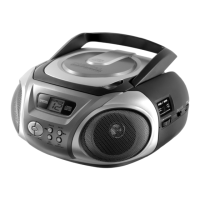
CD-Player
Version 2 cmx® CRC 7210 Side 8 from 14
5. CD-Player
5.1. Insert and removal of discs
When opening the CD-door, always ensure the disc is not in
motion (not spinning) when you open the CD-door. Always
press the “STOP” key to stop the disc spinning first.
Place a CD into the compartment with the label-side (printed
side of disc) facing upwards. Press down in the center part
of disc until the disc “locks” onto the center spindle.
When the CD has been placed onto the center spindle,
gently lower the CD-door downwards until it locks shut.
The CD is now ready to be played.
To remove a disc, follow the same procedure as described
above, except to remove the CD instead of inserting it into
the compartment, by placing one finger at the middle of disc
(center spindle) and the other at the edge of the disc and
gentle pulling upwards.
5.2. CD- and MP3-CD operation
Insert a CD (or MP3-CD) as described. Set the function
switch to “CD”.
Once the CD door is closed (with a disc inside) the set will
immediately read the disc and the display shows the number
from the song (tracks).
Press “PLAY/PAUSE” key and the disk will start spinning
and than playing the first song (track).
At anytime during playback, press “PLAY/PAUSE” to stop
the operation of the unit. Press “PLAY/PAUSE” to resume
the operation at the same track and position.



 To Next Page