4
ENGLISH
1
2
3
4
5
6
7
8
9
10
11
12
13
14
15
16
17
18
19
20
21
22
23
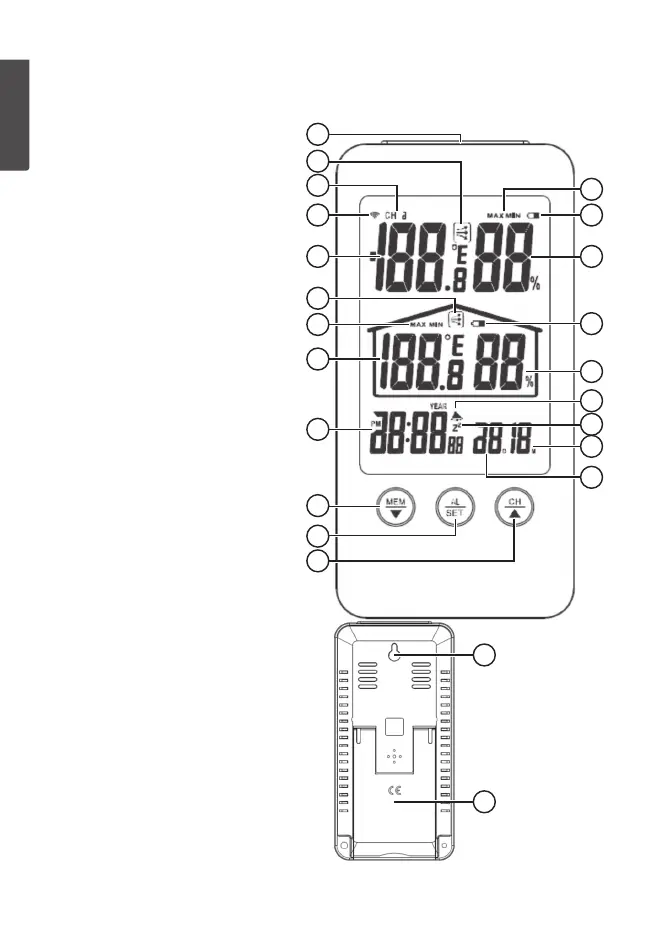
1. [ SNOOZE/LIGHT ] Snooze,
backlight
2. Outdoor Temperature Trend
3. Selected channel
4. Sensor signal strength
5. Outdoor temperature (”LL.L”
or ”HH.H” will be displayed if
thetemperature lies outside of
thethermometer’s range)
6. Indoor temperaturetrend
7. Max/min indoor temperature
indicator
8. Indoor temperature (”LL.L”
or ”HH.H” will be displayed if
thetemperature lies outside of
thethermometer’s range)
9. Clock
10. [ MEM/▼ ] Memory of min/max
temperature. Togglesdown.
11. [ AL/SET ] Selects between
time andalarm. Setsdate, time
andalarm.
12. [ CH/▲ ] Selects which sensor
to display - channel 1, 2 or
3. Pressand hold to scan for
sensors. Togglesup.
13. Max/min outdoor temperature
indicator
14. Battery status icon for sensorunit
15. Outdoor humidity (”LL.L” or
”HH.H” will be displayed if
thehumidity level lies outside of
thehygrometer’s range)
16. Weather station battery status
17. Indoor humidity (”LL.L” or
”HH.H” will be displayed if
thehumidity level lies outside of
thehygrometer’s range)
18. Alarm activation indicatoricon
19. Flashes when thesnooze
function is active
20. Month
21. Day
22. Wall mount eyelet
23. Tablestand
Buttons and functions
Mainunit


 To Next Page