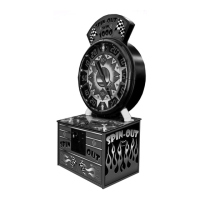
The "Spin-Out" is a skill-based ticket redemption arcade game manufactured by Coastal Amusements, Inc. Its primary function is to provide an entertaining experience where players attempt to stop spinning arrows on specific numbers to win tickets, with a grand jackpot for hitting a particular combination.
Function Description:
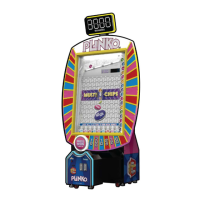
The core gameplay involves a large, circular dial with various numerical values and multipliers. Players initiate the game, causing two arrows – one blue and one red – to spin. The objective is to stop these arrows on advantageous positions. The blue arrow typically lands on a base point value, while the red arrow lands on a multiplier. The total points won are determined by multiplying the value indicated by the blue arrow by the value indicated by the red arrow. For instance, if the blue arrow stops on '100' and the red arrow stops on '10x', the player wins the '1000' point jackpot. Other combinations of numbers also award tickets based on their multiplied value. The game is designed to be intuitive, with a single "STOP BUTTON" used to halt the spinning arrows.
Important Technical Specifications:
The manual provides several configurable options that influence the game's operation and payout structure. These settings are crucial for operators to manage the game's profitability and player engagement.
- Credits Per Game Start (Option 1): Configurable from 1 to 20 credits, with a default of 4. This sets the number of credits required to play one game. Notably, it must be set to "1" if a card swipe system is installed.
- Credits Per Coin (Option 2): Configurable from 1 to 10 credits, with a default of 1. This determines how many credits are awarded per coin inserted or per card swipe.
- Game Time (Option 3): Configurable from 5 to 60 seconds, with a default of 30 seconds. This sets the duration before the arrows automatically stop, adding a time-based element to the skill challenge.
- Point Divisor (Option 4): Configurable from 1 to 5, with a default of 1. This value is used to calculate the number of tickets dispensed: (Points / Point Divisor) = # of Tickets Dispensed.
- Demo Mode (Option 5): Can be ON or OFF, with a default of OFF. When ON, meters and coin errors are disabled, and 4 tickets are paid regardless of the outcome. This mode is intended for demonstration purposes only.
- Attendant Pay (Option 6): Configurable from OFF to 9950, with a default of OFF. This sets the maximum number of tickets the game will pay directly. Any tickets exceeding this setting must be paid manually by an attendant. Increments are by 50.
- Sound in Attract (Option 7): Can be ON or OFF, with a default of ON. This controls whether sound plays when the game is not being played (attract mode). Sound remains active during gameplay.
- "Jackpot" Phrase in Attract (Option 8): Can be ON or OFF, with a default of ON. This determines if the word "JACKPOT" plays during attract mode. It remains active during gameplay.
- Spin Hands in Attract (Option 9): Can be ON or OFF, with a default of ON. This controls whether the arrows spin during attract mode to simulate gameplay.
- Price Per Play (Option 10): Configurable from 25 to 500 cents ($0.25 to $5.00), with a default of 100 cents ($1.00). This sets the cost of one play and increments by 5 cents. This value is critical for accurate bookkeeping statistics.
- Ticket Value (Option 11): Configurable from 40 to 500 (hundredths of a cent) [$0.004 to $0.05], with a default of 100 ($0.01). This sets the value of a single ticket and increments by 5 (hundredths). This value is also critical for accurate bookkeeping statistics.
- Percentage Setting (Option 12): Configurable from 20% to 50%, with a default of 40%. This allows operators to select a desired payout percentage. Increments are by 5. For this setting to operate properly, Options 10 (Price Per Play) and 11 (Ticket Value) must be set accurately.
Usage Features:
The game is designed for straightforward player interaction and operator management.
- Player Interface: A prominent "STOP BUTTON" is the primary player control. The game features "CREDITS" and "SCORE" displays, along with the main dial displays for numbers and multipliers.
- Operator Interface: Accessing settings requires pressing the "ERROR RESET" button located inside the front door while the game is in attract mode. The "OPTION NUMBER" is shown on the CREDITS display, and the "CURRENT VALUE" on the SCORE display. The "STOP BUTTON" toggles between highlighting the option number and its current value. The "ERROR RESET" button increases the highlighted value, while the "ATTENDANT PAY" button decreases it.
- Diagnostic Mode: A comprehensive diagnostic mode is available to troubleshoot various components. This mode is accessed by holding the "ATTENDANT PAY" button during power-up until a beep is heard.
- Test 1 – Lights & Switches: Checks coin mech lamps, the stop button, LEDs around the stop button, and lights along the outside of the dial. It also allows testing of all switches: "STOP BUTTON" displays '79' on the score display; "ERROR RESET" displays '77', dispenses 3 tickets, and increments the ticket meter; engaging coin switches displays '75' (coin 1) or '76' (coin 2), increments the coin meter, and plays the coin input sound; inserting a bill displays '66' on the score display, shows bill value on the credit display, and returns the bill.
- Test 2 – Displays: Checks all digit displays. Dial displays are numbered 1-14. The '100' displays cycle through red, white, and blue. Pressing the stop button cycles credits, score, and dial displays through numerical patterns (0, 1111, 2222, etc., up to 9999).
- Test 3 – Numbers: Checks dial lamps. Lights along the outside of the dial go out clockwise. Inner numbers light on and off.
- Test 4 – Motors & Sensors: Checks arrow motors and sensors. Arrows rotate to the top position, then the red arrow spins clockwise, with its sensor position displayed on the score display. Pressing the stop button stops the red arrow. Pressing it again starts the blue arrow, displaying its sensor position. Another press slowly stops the blue arrow.
Maintenance Features:
The manual outlines several features designed to assist with maintenance and record-keeping.
- Bookkeeping (For Information Only): The game tracks various statistics to help operators monitor performance.
- Regular Win Points Per Game (Option 13): Average number of non-bonus points paid per game.
- Bonus Points Per Game (Option 14): Average number of bonus points paid per game.
- Total Points Per Game (Option 15): Average number of total points paid per game (Option 13 + Option 14).
- Bonus Hit Frequency Percentage (Option 16): Bonus games won divided by the number of games played.
- Clearing Bookkeeping: To clear these statistics, the operator must hold the "STOP BUTTON" while option 13, 14, 15, or 16 is displayed, and then press the "ATTENDANT PAY" button.
- Restoring Factory Settings: To revert all settings to their factory defaults, the AC power must be cycled while holding both the "ERROR RESET" and "ATTENDANT PAY" buttons for at least 5 seconds.
- Critical Warning: A crucial maintenance note is "IMPORTANT! DO NOT TURN OFF GAME WITH ARROWS RUNNING!" This indicates a potential issue or damage if the game is powered down while the arrows are in motion.
- Software Version: The manual specifies a software version of 04-23-14, indicating that the game's functionality is governed by embedded software, which may be updated in future revisions.
Overall, the Spin-Out game is a robust, configurable, and maintainable arcade redemption machine designed for commercial operation, offering a balance of player engagement and operator control over payout settings and diagnostics.

 Need help?
 General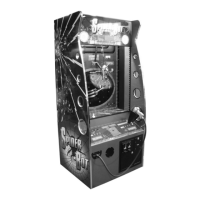



 To Next Page