Important: Always read and follow the information box instructions. • 7
Setting Wheel Dimensions (DIM)
Before a wheel can be balanced, wheel dimensions
must be entered into the computer.
Definition of Dimensions (DIM)
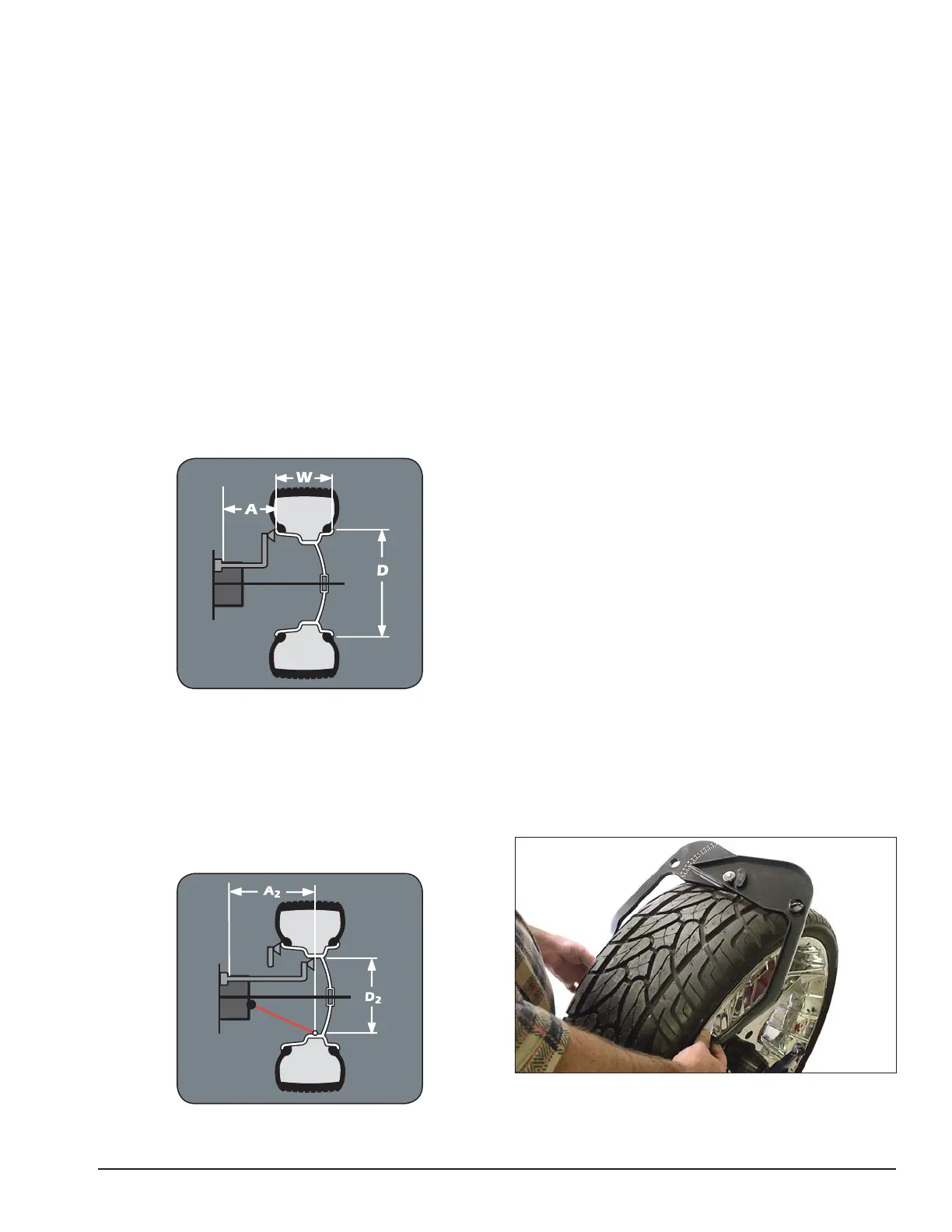
A = Offset The distance measured from the bal-
ancer (“0” on offset arm) to inner plane
of the rim (inner weight location).
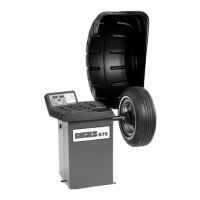
W = Width The width of the wheel at the rim
flanges, measured with the calipers as
shown in figure 13.
Note: Only use calipers provided by the wheel bal-
ancer manufacturer because others may not be the
same.
D = Diameter The diameter of the wheel as indi-
cated on the tire.
Note: A thick flange, on some aluminum wheels, can
effect the measured diameter. For example, a 16-inch
rim can have a measured diameter of 15.5-inches.
Figure 12A - A, W, and D Tire Dimensions
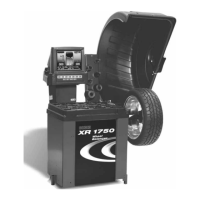
A2 = Offset The distance measured from the bal-
ancer (“0” on offset arm) to outer plane
of the rim (outer weight location). Used
only in T2-Tape mode.
D2 = Diameter The diameter as measured at the
A2 weight location. Used only in
T2-Tape mode.
Figure 12B - A2 and D2 Tire Dimensions
Basic Wheel Data Entry
1. Select the Clip 1 or T1 -Tape weight location and
the T3 - Tape or Clip 2 weight location.
2. Position offset arm at clip weight location; wait for
BEEP (A & D enters automatically).
3. Return offset arm to home position.
4. Use caliper and measure rim width.
5. Enter caliper measurement into W on balancer.
6. Lower hood and spin wheel.
Entering Wheel Dimensions Manually
Information entered into the balancer software for A,
W, and D can be changed anytime during a balancing
procedure by entering the measurements manually. The
balancer will recalculate weights and positions based on
the new measurements.
Wheel Offset - A
1. Press the A (wheel offset) key.
2. Position offset arm at weight location on wheel and
read the number on the offset arm gauge, at the cabinet
(this is the correct offset A DIM).
3. Use the keypad to enter the measurement.
Wheel Diameter - D
1. Press the D (wheel diameter) key.
2. Inspect mounted tire sidewall to determine the
exact diameter that is printed on the tire.
3. Use the keypad to enter the D (Diameter DIM) to
match the tire sidewall size.
Note: Auto entry is the preferred method for enter-
ing A2 and D2. However, to manually enter A2, press
SHIFT A or D2, press SHIFT D.
Wheel Width - W
1. Press the W (wheel width) key.
2. Use the plastic calipers provided with the wheel
balancer to measure the wheel width.
Figure 13 - Caliper Placement On Wheel
3. Use the keypad to enter the W (Width DIM) to
match the measured caliper width of the mounted rim.


 To Next Page