P. 1
PRODUCT INTRODUCTION
Congratulations on the purchase of a new Accessport hand-held
programmer. This quick start guide explains how to install the Accessport
on your vehicle. Refer to the Accessport user manual located online at
www.cobbtuning.com/subaru-ap. Check the website for more information
about features, capabilities and additional instructions.
The Accessport can:
• Reprogram the factory engine control unit (ECU) with improved tuning
parameters through the on-board diagnostic (OBD-II) port
• Monitor vehicle sensor data
• Read and clear engine diagnostic trouble codes (DTCs)
• Measure 0-60 and 1⁄4 mile times
• Monitor current and average fuel economy
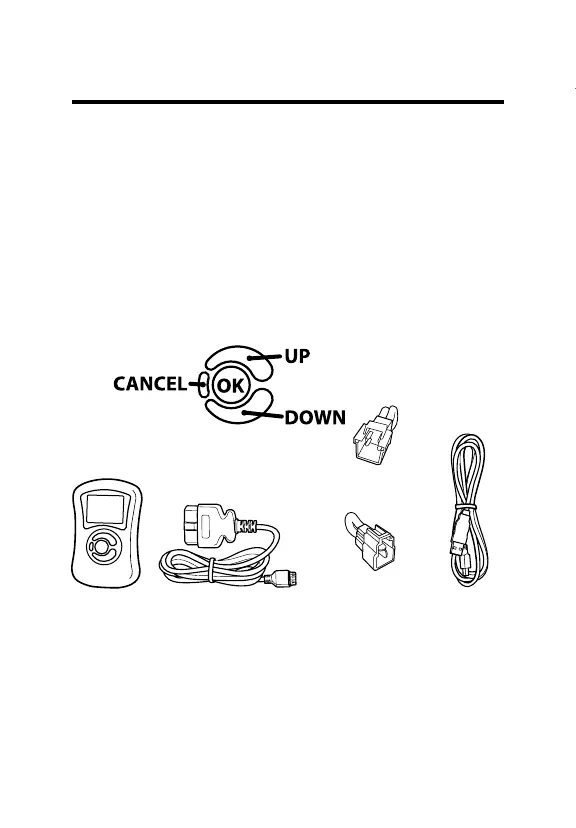
Accessport Buttons:
In-Box Contents:
Accessport USB CableOBD-II Cable
ACCESSPORT INSTALLATION
2002 WRX Initialization
Connector (BLUE)
If applicable
2003-2005 WRX Initialization
Connector (WHITE)
If applicable
Please visit www.cobbtuning.com/apmanager to download Accessport
Manager for your computer operating system as well as get access to the
latest COBB Tuning O-The-Shelf maps for your Accessport.
If you have issues transferring maps or updating the Accessport while using
USB 3.0 ports, please try using a USB 2.0 hub adapter. For any questions, please
contact our support team at 866-922-3059 or support@cobbtuning.com


 To Next Page