Need help?
Do you have a question about the Cobra CDR 840E and is the answer not in the manual?
Key safety, security, and privacy guidelines for using the device.
Step-by-step guide for attaching the dash cam to the windshield.
Instructions for turning the device on/off, charging, and managing the memory card.
Introduces the different operating modes: Video, Still Photo, and Playback.
How to record, lock files, and understand G-sensor impact detection.
Browsing saved videos/photos and initiating playback.
Control playback speed, pause, resume, and adjust audio volume.
How to use the software to view videos with GPS, manage files, and navigate playback.
 General
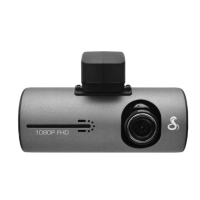
| Screen Size | 2.7 inches |
|---|---|
| Field of View | 140 degrees |
| Loop Recording | Yes |
| G-Sensor | Yes |
| Night Vision | Yes |
| GPS | No |
| Video Resolution | 1080p |
| Storage | Supports microSD cards up to 32GB |
| Battery | Built-in rechargeable battery |

 To Next Page