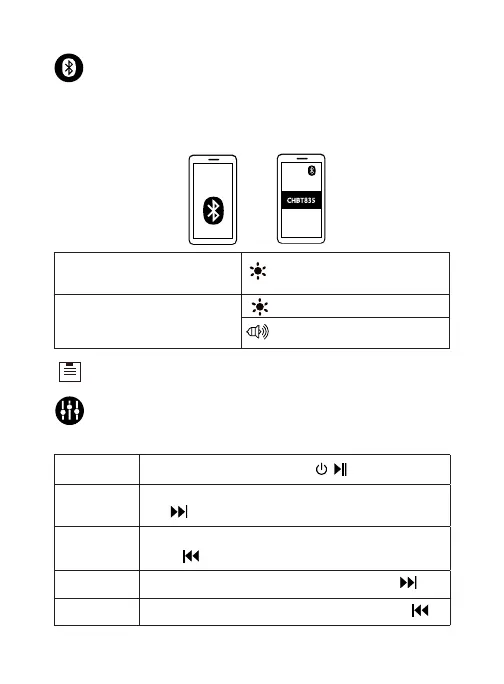
Bluetooth connection with your device
When the headphone is turned on, it will automatically enter Bluetooth
pairing mode with your media device.
Turn on Bluetooth in your device’s settings and search for “CHBT835”, then
tap “CHBT835” to connect.
EN 3
Alternating ashing red and blue
on the left earbud.
The headphones will automatically be paired with your last sucess-
fully connected media device next time it is turned on.
Pairing mode
Connected to a device
(Successfully paired with your
media device).
Connected tone notication
Slowly ash blue
Controls
Music mode
Press the “Next Track / Volume Up” button +V /
Press the “Play / Pause” button / once.
Press and hold the “Previous Track / Volume Down”
button /V-
Press and hold the “Next Track / Volume Up” button
+V /
Press the “Previous Track / Volume Down” button /V-
Volume down
Volume up
Play / Pause
Next track
Previous track


 To Next Page