15
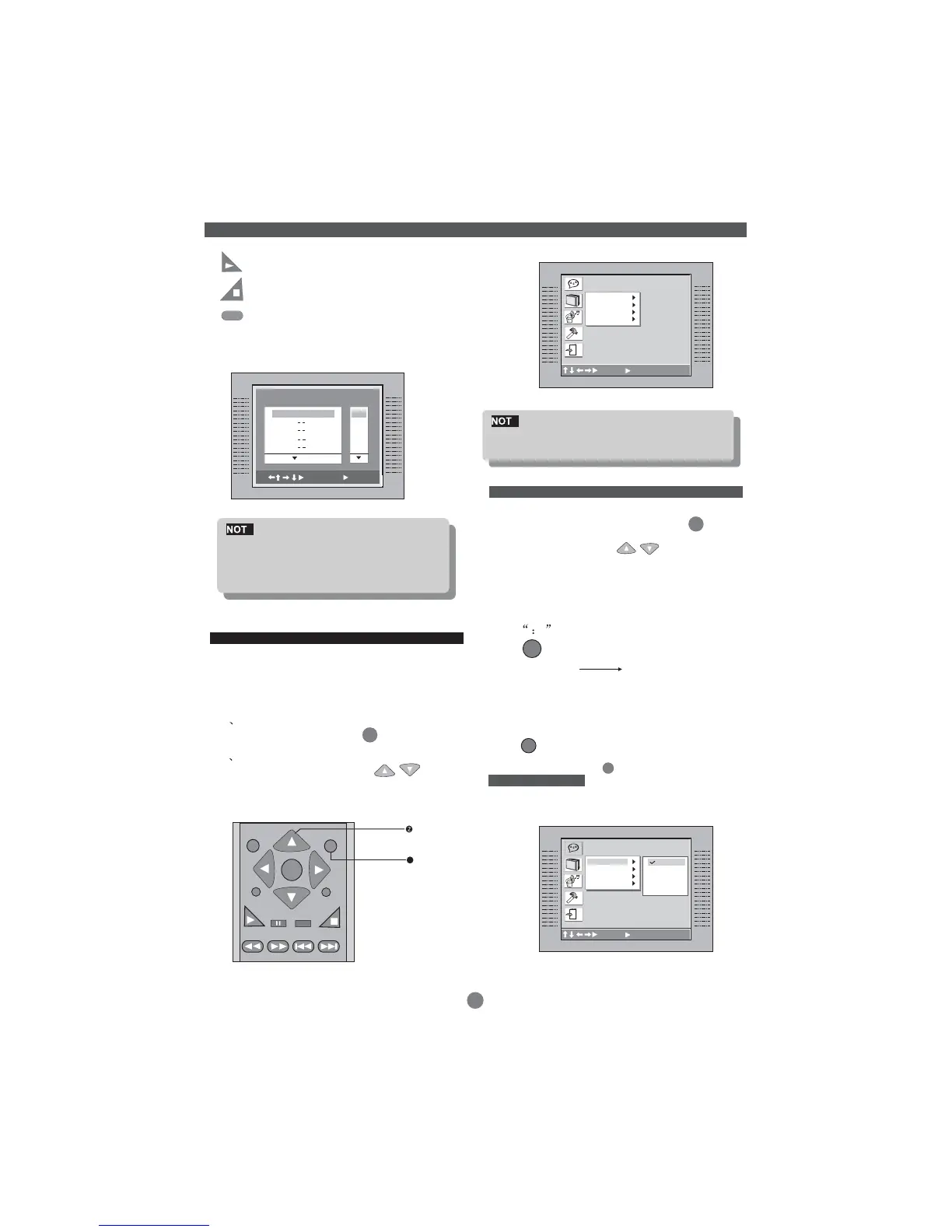
(PLAY) --- Press PLAY button to start program
play.
(STOP) --- Press twice STOP button to quit the
program mode.
(CLEAR) --- Press CLEAR button if you want to
cancel the wrong information you input
before or cancel the desired track. Press
CLEAR again to cancel all the tracks.
E
Some DVD disc do not allow program
setting. Single track disc cannot be
programmed, MP3 disc cannot be pro-
grammed.
Various features of the player can be adjusted in the
SETUP menu:
1 Press SETUP button
SETUP menu appears.
2 Press the UP/DOWN button
to highlight the desired menu.
SETUP
SETUP
E
Do not move any bar to select item, please
make sure the mode is in stop mode.
LANGUAGE MENU
Default setting
In STOP mode, press SETUP button
highlight Language.
Press UP/DOWN button
Press ENTER button , the screen displays sub-
menu.
Press UP/DOWN button to highlight the desired
item in the LANGUAGE.
SETUP
Menu
Press to confirm your selected item.
Select the players OSD .
Press to confirm the selection.
Press SETUP button to quit.
OSD ENGLISH
FRENCH
GERMAN
ITALIAN
SPANISH
ENTER
ENTER
FUNCTION BUTTON
SETUP MENU
ENTER
PBC
SETUP
1
ZOOM
STOP
PLAY
PS/IS
RETURN
C
A
B
Language Setup
OSD
Menu
Audio
Subtitle
C
A
B
Language Setup
OSD
Menu
Audio
Subtitle
English
French
German
Italian
Spanish
: Move :select SETUP:Quit
: Move :select SETUP:Quit
PROGRAM
Track
1. 02
2.
3.
4.
5.
01
02
03
04
05
:Select
:Play
ENGLISH


 To Next Page