Instructions
6
After Sales Support
Telephone: 1300 663 907
Internet: www.winplus.com.au
PA & DJ Speaker Playback Functions
EQ Functions.
You can adjust the frequency levels of the audio output using either the automatic EQ function
for Bluetooth, USB, SD and radio playback or manually using the Master Equalization levels on the
control panel.
Master Equalisation.
Each level will either boost or cut the specied frequency levels. You can use this to customise your
listening experience. Try dierent combinations to suit your needs.
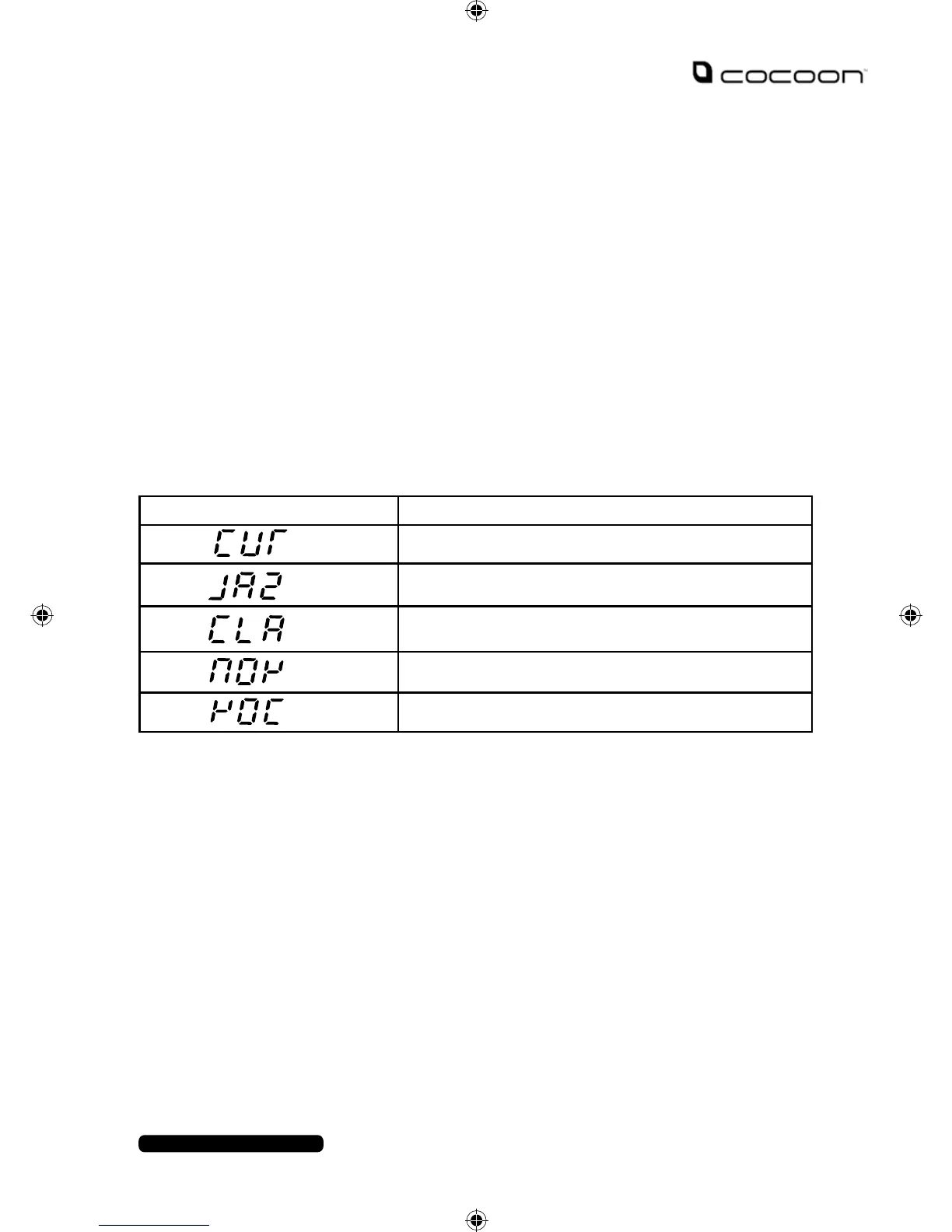
EQ Functions
There are 4 EQ presets to choose from to enhance the audio for dierent genres of music.
Note: If you alter the Master Equalisation settings during playback, the EQ will switch to the
Master Equalisation settings.
SD Card Playback
You can play music les from an SD card using the SD card slot on the PA & DJ Speaker System.
1. Insert your SD card, up to 32GB, (not included) to the SD card slot with the
contacts face up.
2. Once inserted the LCD screen will display SD and begin automatic playback.
3. You can use the playback functions from pg. 5 to control playback.
Note: The PA & DJ Speaker System can playback the following audio le formats: MP3, MP4, WMA
and WAV.
Symbol Function
Uses the current Master Equalisation settings
Best for Jazz music playback.
Best for Classic music playback.
Best for Pop music playback
Best for Rock music playback


 To Next Page