5.6 Co n t R o l l I n G mo R E tH A n on E DE V I C E
As the IR Extender lead has three IR emitters, you can simultaneously operate more than
one device from the remote location. For example, you can control the PayTV box as well
as the DVD player from the remote room.
Simply stick on an IR transmitter diode (as per the instructions in 5.5) to each device that
you want to be able to control from the remote location (see opposite page - Fig. 5.8.3).
5.7 Co n n E C t I n G t H E mA I n S po W E R AD A p t E R
Connect the mains adapter for the Transmitter to the 7.2V socket (labelled DC 7.2V).
Plug the adapter into a wall socket (2V0V a.c. ~ 50Hz).
Set the ON/OFF switch to the ON position. The operating LED will illuminate.
Raise the Transmitter aerial and direct it towards the location of the Receiver.
5.8 Ex A m p l E S o f ty p I C A l Co n n E C t I o n Co n f I G U R A t I o n S - tR A n S m I t t E R
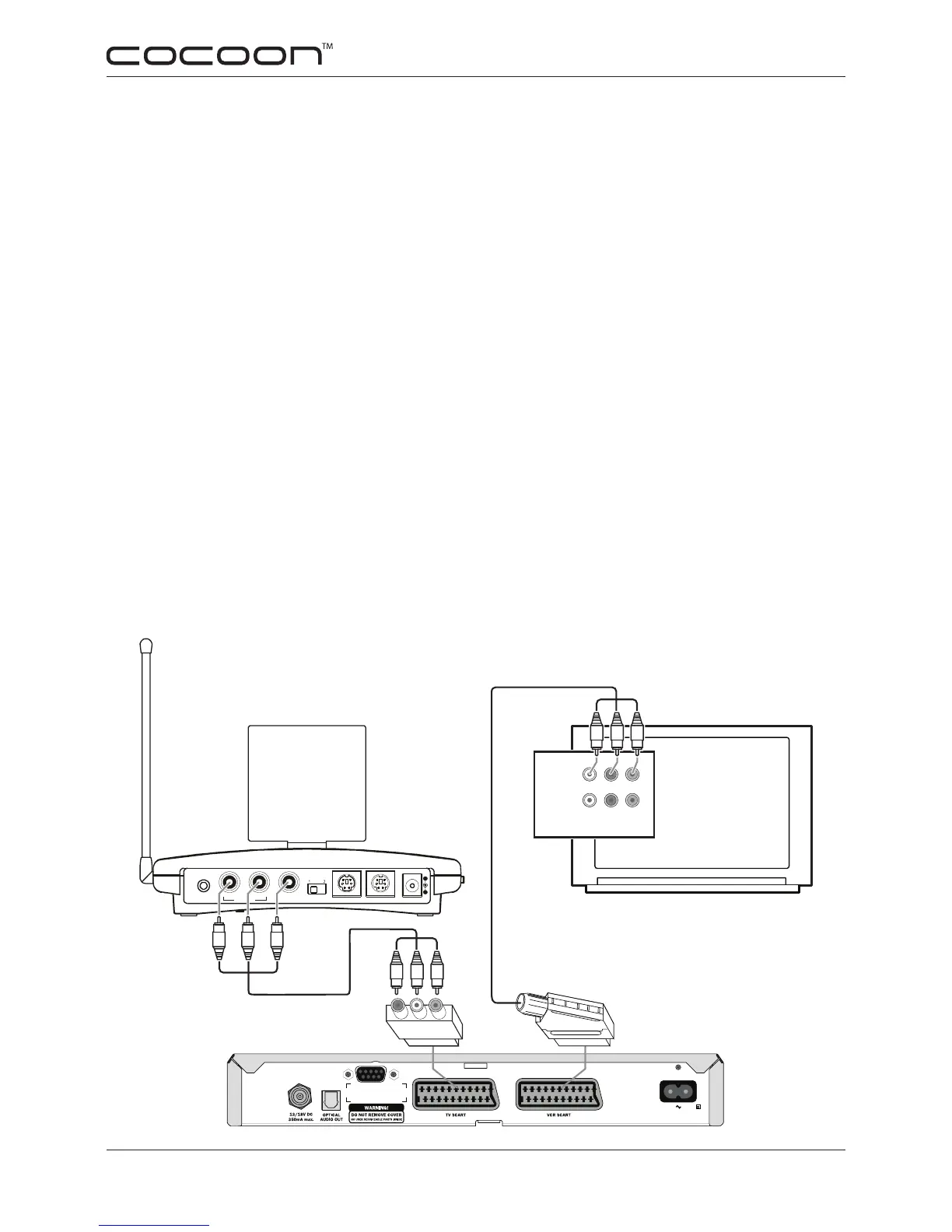
Fig. 5.8.1 This is an example of a typical setup connecting the AVS58 to only one source - PayTV via
SCART connection as well as PayTV being connected directly to the TV. Note: Other setup congura-
tions are possible - this setup is one of the simplest and does not connect the AVS58 to the main TV.
YR W
AUDIO / VIDEO IN
INPUT 1
INPUT 2
LRV
LRV
VIDEO INAUDIO IN
RIGHT LEFT
A/V IN A/V OUT DC 7.2V
SOURCE
IR EXT.
240V 50Hz
LNB IN
RS-232-C
Y
R
W
YWR
Tr ansmitter
W = White (Audio - Left)
R = Red (Audio - Right)
Y = Yellow (Video)
Note: This cable is not supplied. Connection
from PayTV box directly to TV set is respon-
sibilty of the PayTV provider.
Main TV


 To Next Page