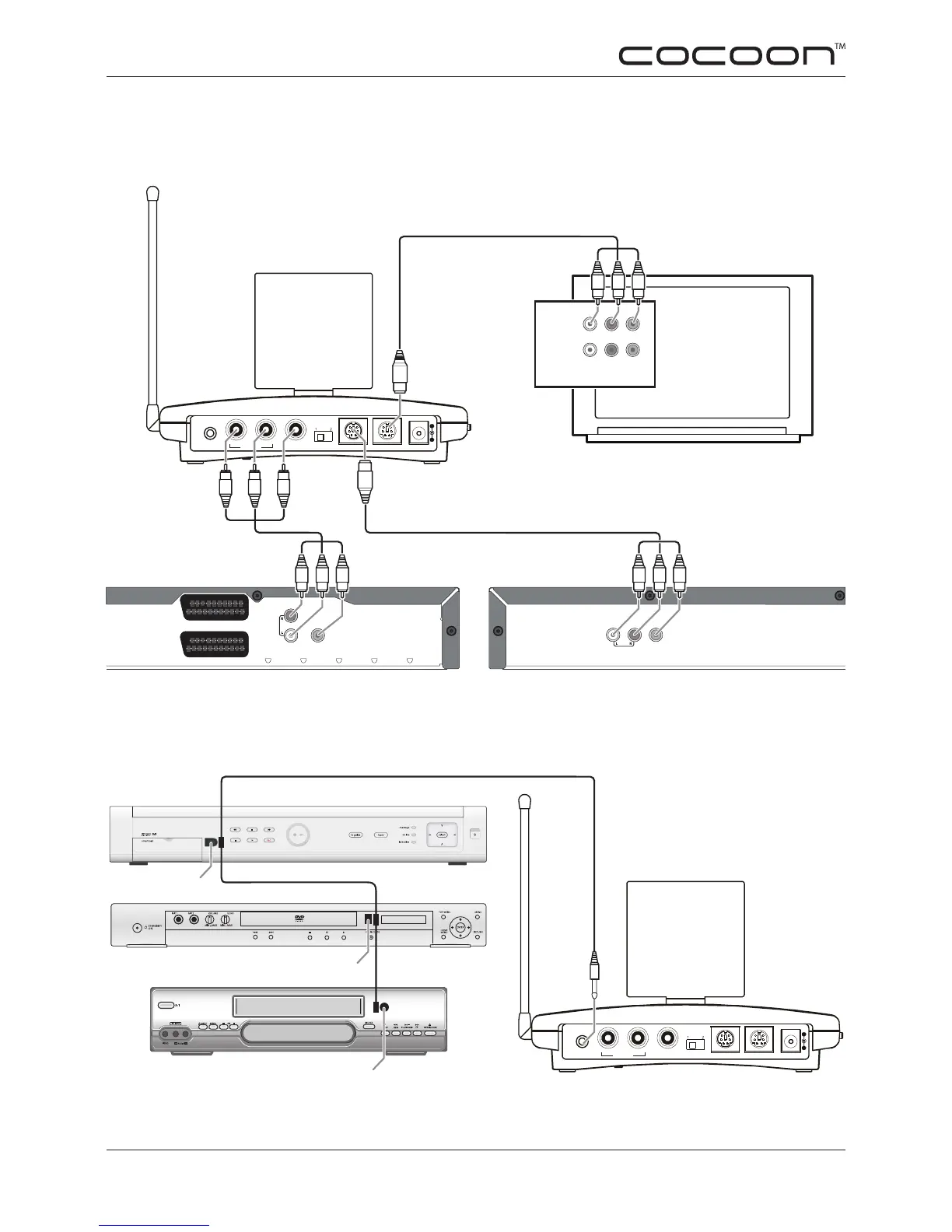
W = White (Audio - Left)
R = Red (Audio - Right)
Y = Yellow (Video)
PayTV (Source 1) DVD (Source 2)
Main TV
Fig. 5.8.2 This is an example of a typical setup connecting the AVS58 to PayTV and a DVD player via
RCA connections. Note: Other setup congurations are possible - this setup also connects the AVS58
to the main TV allowing you to switch between Source 1 (PayTV) and Source 2 (DVD).
Fig. 5.8.3 This is an example of a typical setup of the IR Extender lead which allows you to use a
remote control to control your devices from the receiving location. You can control from one to three
devices - this example shows a setup allowing you to control three devices.
FOR TROUBLE SHOOTING TIPS SEE PAGES 14-15
FOR MORE WIRING EXAMPLES & HELP - PLEASE VISIT WWW.COCOONSYSTEMS.COM.AU


 To Next Page