9
Negative Lock Output (GREEN)
Negative Unlock Output (BLUE)
Negative Second Door Unlock Output (BLUE/GREEN)
The door lock / unlock outputs are designed to control several different types of systems which may
require additional parts. Please review the wire and location chart to see which type of door lock system
is in the vehicle. The most common types are shown in the diagrams below.
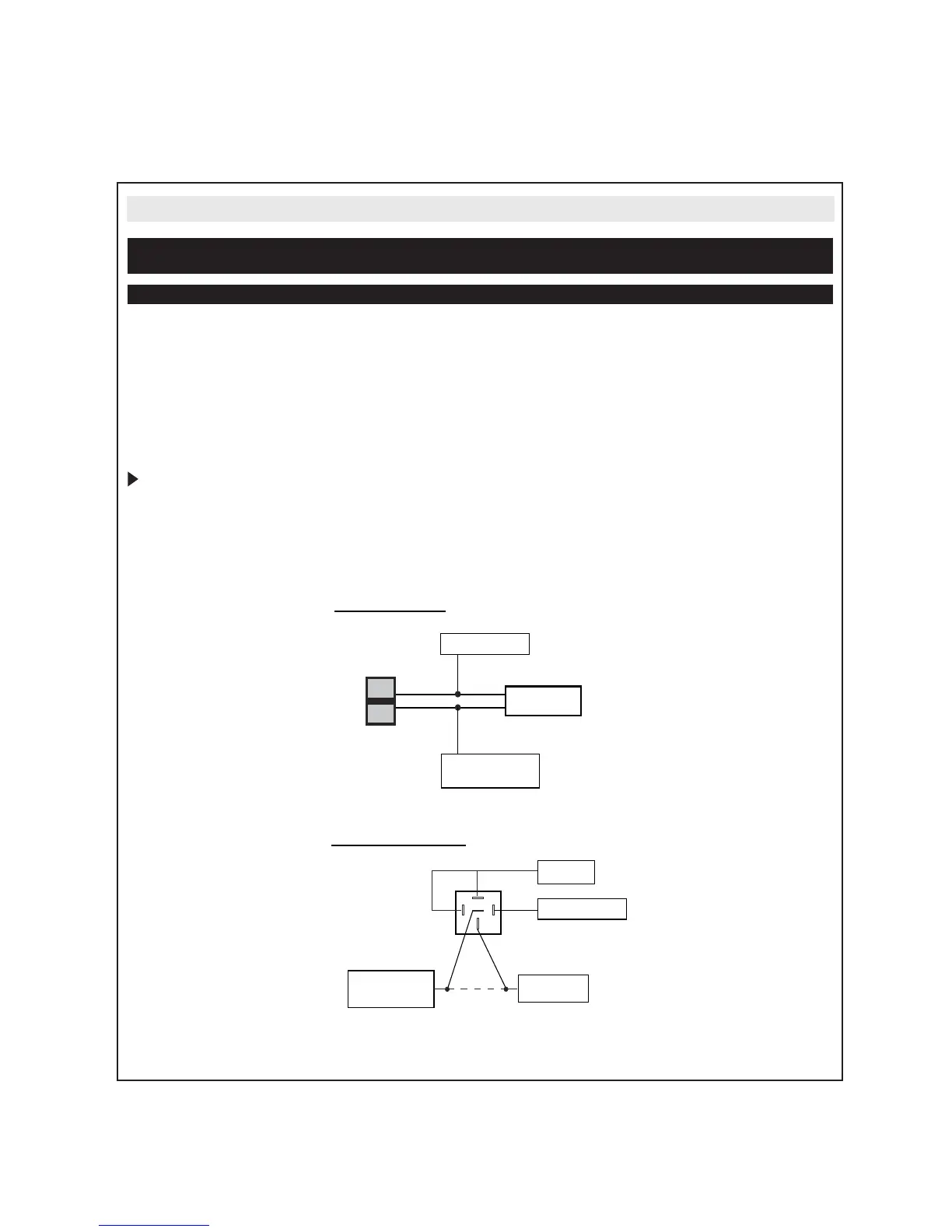
Negative Switching and Negative Switching with 2-step unlock feature:
All Door Lock and Unlock: Locate the lock / unlock wire at the vehicle’s lock / unlock switch.
Verification: These wires will register ground when the lock and unlock switches are activated.
Driver’s Door Unlock: Locate the unlock motor wire directly from the actuator inside the driver’s door.
Verification: This wire will rest at ground and register positive voltage when the driver’s door is unlocked.
Connect the GREEN and BLUE or BLUE/GREEN wires shown in the diagram below.
Note: When adding the 2 step unlock feature the BLUE/GREEN 2nd door unlock wire will be used to
unlock all vehicle doors on the second press of unlock. An additional SPDT relay (not supplied) is
required. Connect the relay as shown in the diagram below to unlock the driver’s door on the first press of
unlock.
4. 3 PIN HARNESS
Lock
Unlock
87
87a
86
85
30
Vehicle Door Lock
Control R elays
GREEN (-) Lock Output
BLUE (-) Unlock Output or
BLUE/GREEN 2nd Unlock
Output for 2 S tep Unlock
For 2 Step Unlock:
Fused +12 Volt
B a tte ry S ouc e
BLUE (-) Unlock Output
From Keyless Entry
Module or Door
Unlock R elay
Drivers Door
Unlock Motor W ire
X
Cut
Negative Locks:



 To Next Page