
 Need help?
Do you have a question about the Code Alarm ELITE Series and is the answer not in the manual?
Instructions on how to arm the system, including parking light flashes and LED status.
How to temporarily bypass passive arming and return to normal status.
How to arm the system while ignoring the shock sensor for one cycle.
How to arm the system with a silenced siren/horn if triggered.
Procedure to disarm the system, including parking light flashes.
Unlocking only the driver's door first, then all doors.
How to open the vehicle's trunk or hatch using the remote.
How to activate optional features like power windows simultaneously.
Steps to enter AUX mode to control additional outputs like AUX 2-5.
How to locate the vehicle using parking lights and sound.
How to activate the panic alarm and stop it.
How the LED indicates the number of programmed transmitters for security.
How to enter/exit valet mode where security functions are disabled.
How to toggle system ARM/DISARM chirps ON or OFF.
How to control the LED indicator being ON or OFF when armed/locked.
Procedure to disarm the system without the transmitter (e.g., lost remote).
How to trigger and override the carjack mode for safety.
Explanation of different LED flash patterns and their meanings.
Meanings of different chirp counts from the siren or horn.
Meanings of different parking light flash patterns.
How to check the current status of the vehicle using the remote.
How to turn on the remote's LCD display illumination.
How to set the remote to vibrate, play a melody, or both.
How to toggle button beep sounds on or off.
How to activate battery save mode for the remote transmitter.
How to clear melody sounds and flashing icons from the LCD.
How to stop the alarm trigger melody without disarming.
How to toggle the button lock feature on or off for the remote.
How to toggle the remote's display illumination on or off.
How to enter and exit 2 car mode to control a second system.
How to use the parking meter countdown timer feature.
How to adjust clock, alarm clock, and countdown timer settings.
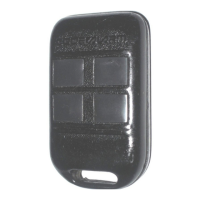
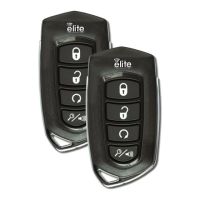
Steps to replace batteries in the 4-button remote control.
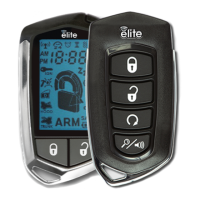
Steps to replace batteries in the 2-way LCD remote control.
Step-by-step guide to program new remote transmitters to the system.
Specific instructions for programming remotes for 2 car mode.
 General
| Remote Start | Yes |
|---|---|
| Keyless Entry | Yes |
| Number of Remotes | 2 |
| Series | Elite |
| Remote Control | Yes |
| Shock Sensor | Yes |
| Ignition Kill | Yes |
| Starter Kill | Yes |
| Panic Mode | Yes |
| Valet Mode | Yes |
| Remote Start Ready | Yes |
| Compatibility | Universal |


 To Next Page