Code Blue
•
259 Hedcor Street
•
Holland, MI 49423 USA
•
800.205.7186
•
www.codeblue.com
GU-145-Epage 19 of 23
IA3100
Administrator Guide
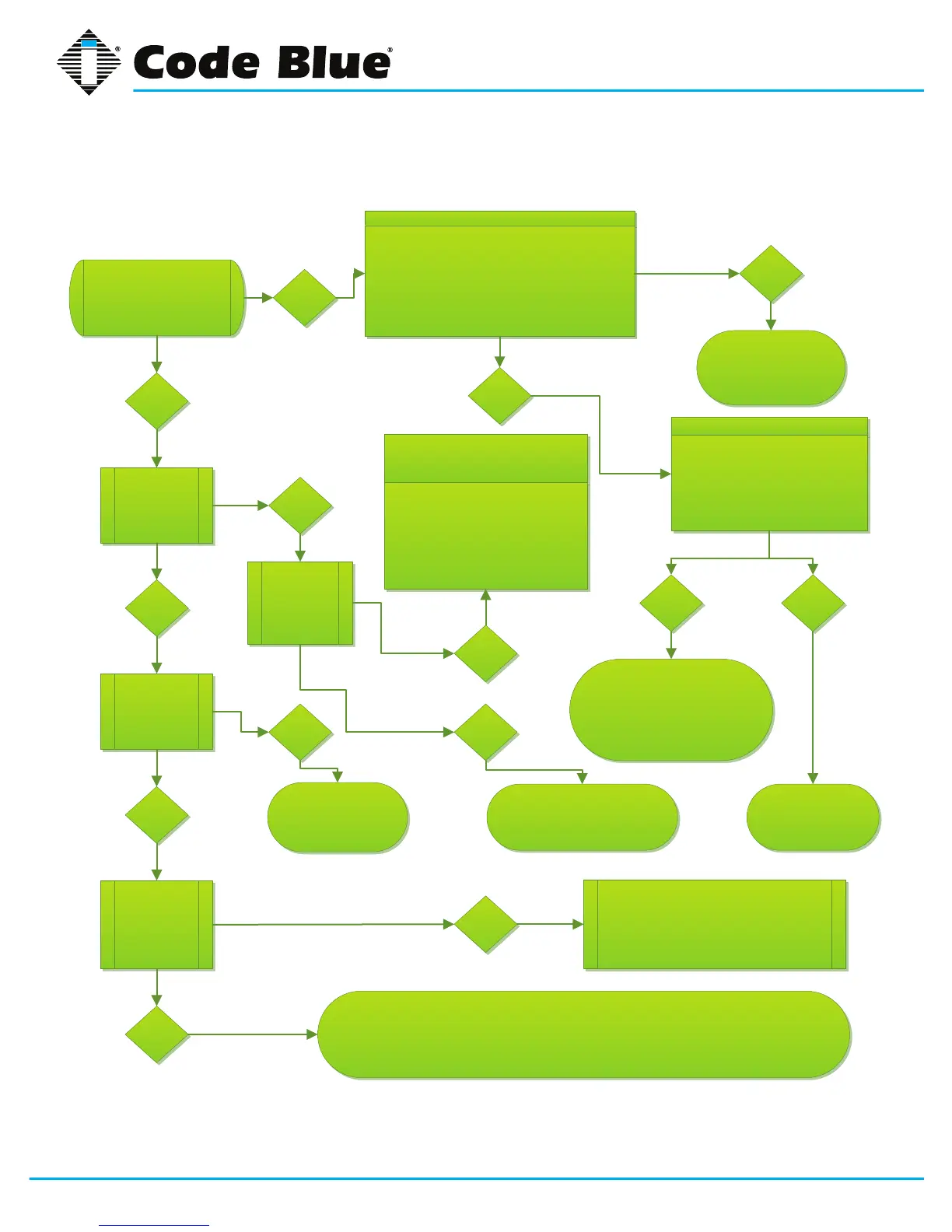
Activate the Red Button.
Did the red LED (call being
placed) illuminate, and did
you hear a noise
Did you hear
dial tone?
Did you hear
the phone dial
the
programmed
number?
Do you hear
ringing.
Ensure the ribbon cable is plugged into the
faceplate IDE connector. Verify the red button
connector is plugged into J3 on the printed circuit
board on the faceplate. Verify the actual voltage on
pins 1&2 of the green Phoenix connector. Did the
voltage meet specifications (12-24 VAC or 12-30
VDC)?
Correct the lack of power
issue
CB3100 only
Disconnect the ribbon cable from the
faceplate and the 14 pin green
Phoenix connector found at the
bottom of the blue box.
Then reconnect both and test.
Did this resolve the issue?
No
The problem was
excessive AC
voltage. Correct by
lowering the voltage
to published
specifications.
Check for dial tone on pins 3 & 4 of
the 14 pin green Phoenix connector.
Follow the wires back to the surge
suppressor and test for dial tone on
both side of protector. If there is dial
tone on the input then replace the
surge suppressor. If there is no dial
tone check with the service provider.
Can the called party hear you? If not you my be on a Ring Down line, reprogram the phone using CMD
354# (page 4 in the program booklet).
Please contact Code Blue Technical Support:
1-800-205-7186 Option 3 if this does not resolve your issues.
No
Yes
Yes
Yes
Yes
Yes
Yes
No
No
No
Did you hear
ringing
Instead?
No Yes
No
Program command 354# into the
phone for ring down operation.
Contact Tech
Support:
1-800-205-7186
Option 3
Verify the correct phone
number is programmed
(50<<number>>#)
Did the phone retry? If yes, change CMD
8715# (increase wait time). If the problem
continues then contact
Tech Support:
1-800-205-7186 Option 3


 To Next Page