Do not attempt to use the balanced
outputs with conventional
single-ended equipment, as damage to
the Codex may result.
As most headphones are wired for single-ended
operation, insertion of any single headphone into
one of the front-panel jacks will automatically
switch the Codex into single-ended mode.
It is not recommended to use the rear-panel
connectors to drive a stereo system while
simultaneously listening to headphones.
In single-ended mode, the rear-panel
jacks will not output the correct
signals. While this will not damage any
equipment, you will not hear the
proper sound quality from your
speakers in this situation.
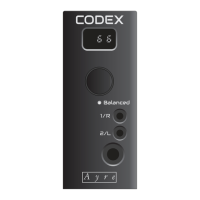
When two 3.5 mm mini-plugs are connected, the
setup menu is automatically entered and the Codex
will ask if you have connected two separate
headphones for shared listening with a friend, or a
special balanced headphone cable with two 3.5 mm
mini-plugs.
The display will flash to indicate that an input is
required. Rotate the volume knob to select either
“Shared” mode (Shr) for two headphones or
“Balanced” mode (BAL) for special balanced
headphones. Press the volume knob to enter the
desired selection and exit the setup menu.
15


 To Next Page