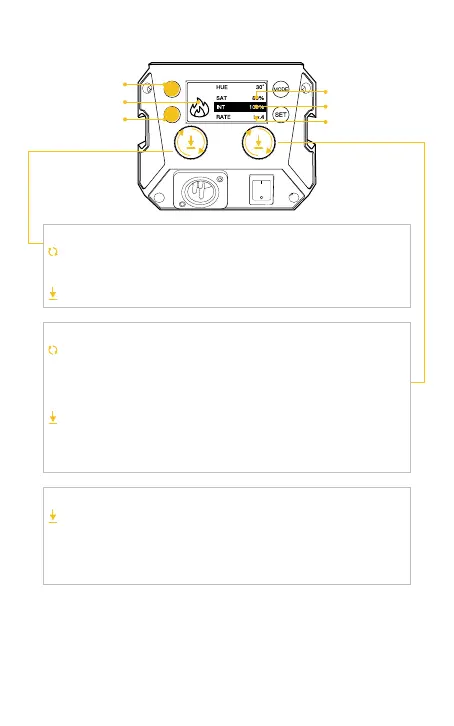
Light Eect Mode
(EFF) Button
Light Eect
Frequency (RATE)
Button
EFF
Color Temperature
Brightness
Rate
5. EFF-HSI Mode (Short press EFF Button then press the left knob to
switch to EFF-HSI Mode.)
Rotate the Knob counterclockwise to adjust options: brightness,
color temperature.
Short press to switch to EFF-CCT Mode
Rotate the knob counterclockwise to adjust parameters.
HUE : 0° ~359°
SAT : 0%~100%
INT : 0%~100%
Short press the knob to quickly switch the preset parameter.
HUE:0° /60° /120° /180° /240° /300°
SAT:0%/25%/50%/75%/100%
INT:0%/25%/50%/75%/100%
Option Adjustment Knob
Parameter Adjustment Knob/Parameter Preset
Short press to switch the frequency varies eect, Lv.1~Lv.5+
RANDOM.
Short press to switch the eect
according to dierent special eects. Some are color, some are
speed, and some are strength.
Light Eect Frequency (RATE) Button



 To Next Page