If the icon ashes, it means that the internal temperature
of the product is too high, and cooling measures need
to be taken. If the icon disappears, it means that the
operation is normal.
④ Product Overheated Alarm Icon
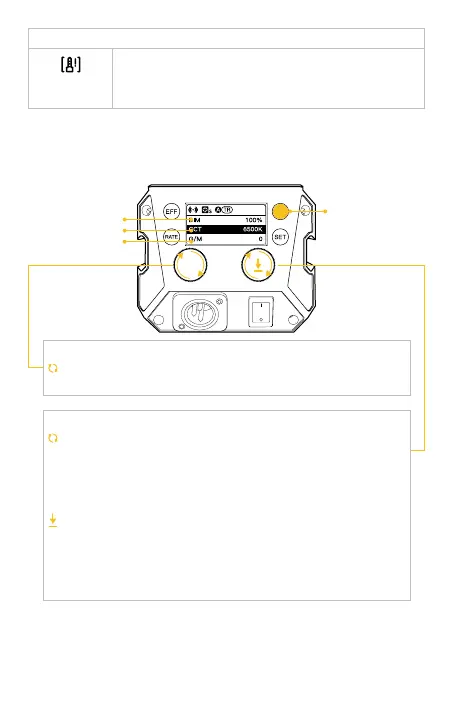
2. CCT Mode (Short press Mode Button to switch CCT Mode and HSI
Mode)
* Default: CCT Mode
Brightness
Color Temperature
G/M Balance
MODE Button
Rotate the Knob counterclockwise to adjust options: color
temperature, brightness, G/M Balance.
Rotate the knob counterclockwise to adjust parameter of color
temperature, brightness and G/M Balance:
Brightness (DIM): 0%~100%
Color temperature: 2700-6500K
G/M Balance: Green10~1-0-Magenta1~10
Short press the knob to quickly switch the preset parameter
of color temperature, brightness and G/M Balance:
Preset brightness:0%、25%、50%、75%、100%
Preset color temperature:2700K、3200K、4000K、5600K、
6500K
G/M Balance: Short press return to zero.
Option Adjustment Knob
Parameter Adjustment Knob/Parameter Preset



 To Next Page