PR750H
User manual
Version: 5
Page: 14 of 21
Date: 2023.05.25
1 Start-up page
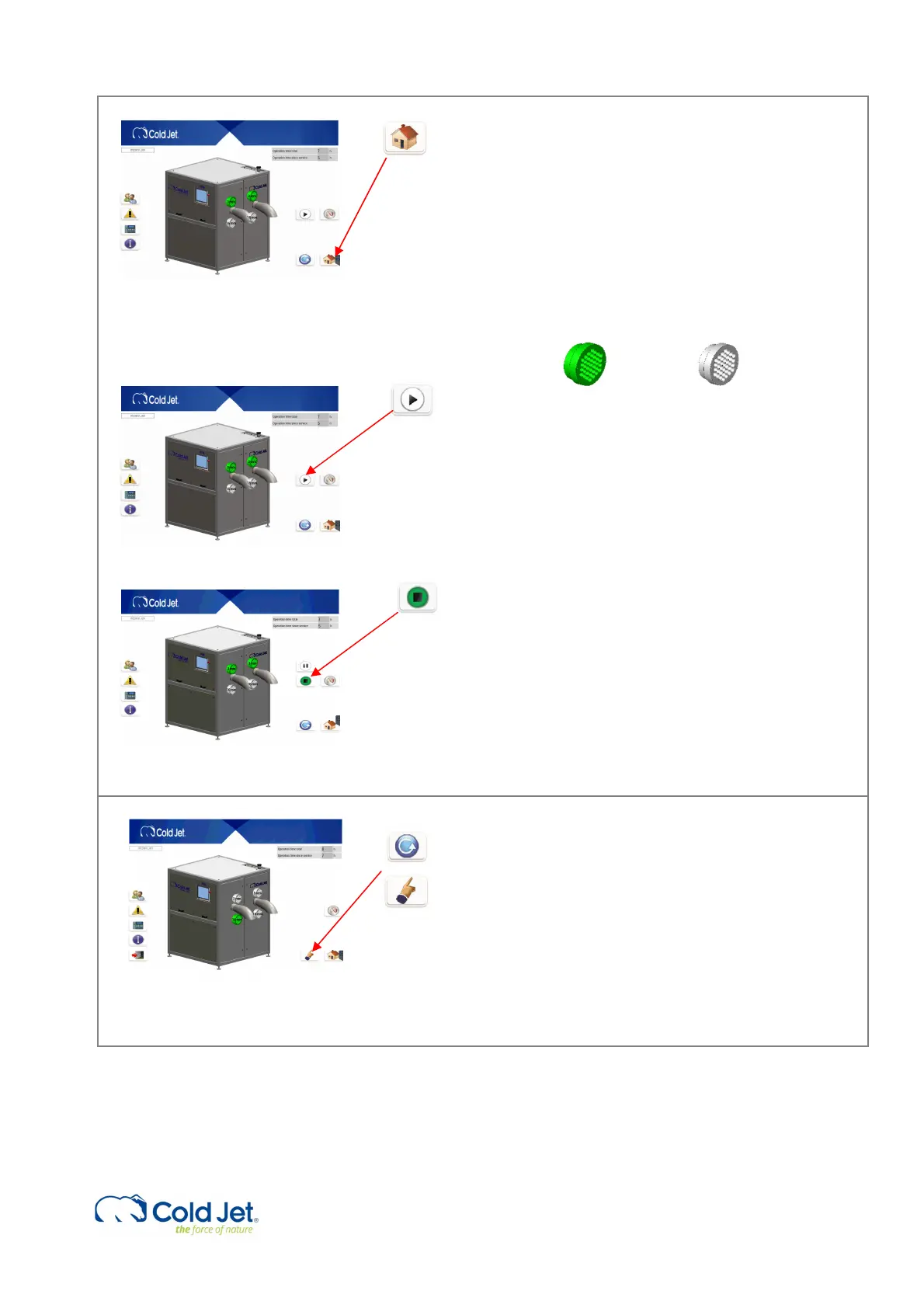
This page can be activated from any page by pressing
the “Home button” in the lower right-hand corner.
The main page shows if the extruder is selected by
the color of the die plate above/under the outlet
sprout is green. If the die plate is grey then it has not
been selected. It also displays which extruder plate is
selected, indicated on the die plate. It is possible to
run with 1 or 2 sides.
Active Inactive
2 Start, stop, and pause
The main functions can be activated by pressing one
of the three buttons on the main screen.
By activating the “Start / Stop” button the machine
starts or stops when in operation mode. When
activating the PR750H, the standby buttons will be
visible. Activating standby mode the PR750H will go
into a pause mode.
When the PR750H is in a standby mode, the HMI
screen changes the start buttons color to yellow. If
the pause time exceeds the set pre-entered set point,
the machine will automatically run a stop cycle and re-
enter operation mode after the cycle is done.
3 Manual/Automatic
By activating the “mode select” button, it is possible
to choose between automatic mode and manual
mode.
The default selection is automatic mode, which must
be selected for production. In manual mode, the
PR750H can be turned off.



 To Next Page