Need help?
Do you have a question about the Collective Minds HORIZON STRIKEPACK and is the answer not in the manual?
Explains the adapter's functionality and provides support contact details and resources.
Step-by-step instructions for firmware update and initial connection to controller and console.
Default pairing mode enabling button mapping without M.O.D.s. Indicators are WHITE.
App-activated mode for M.O.D.s. Gear Head Eyes pulse GREEN.
Temporary mode for paddle mapping via controller. Indicators turn PURPLE.
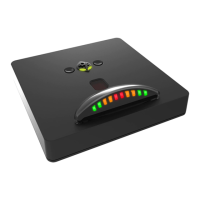
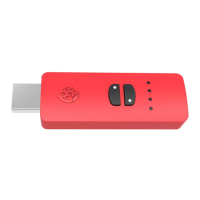
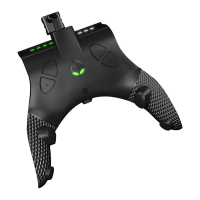
The STRIKEPACK HORIZON™ is an app-powered wired controller adapter designed to enhance the gaming experience for Xbox Series X|S® and Xbox One® consoles. This device adds advanced gaming functionality to existing standard Xbox® controllers without requiring any permanent modification or voiding of the controller's warranty. It integrates seamlessly with the controller, providing a suite of features that cater to competitive and casual gamers alike.
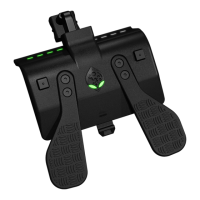
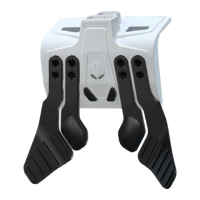
At its core, the STRIKEPACK HORIZON™ upgrades your controller with four paddles, offering additional input options that can be mapped to various controller buttons. These paddles are strategically placed for ergonomic access, allowing for quicker reactions and more complex maneuvers without removing your thumbs from the analog sticks. This physical enhancement is complemented by a robust software suite, accessible via the STRIKEPACK™ Central smartphone app, available for iOS 15.0 and Android 9.0 or later. The app is the gateway to a vast array of M.O.D.s (Macros On Demand) and advanced configuration options, enabling users to customize their gameplay experience extensively.
The device supports a wide range of M.O.D.s, including popular features like Rapid Fire, Anti-Recoil, Turbo, and Button Record & Playback. These macros allow players to automate complex button sequences or enhance existing controller functions, providing a competitive edge in various games. The app-powered nature of the STRIKEPACK HORIZON™ means that users can explore thousands of M.O.D. combinations and fine-tune advanced configurations to suit their specific playstyle and game requirements. This level of customization ensures that the device can adapt to different gaming genres and player preferences, making it a versatile tool for any serious gamer.
Setting up the STRIKEPACK HORIZON™ involves a few straightforward steps. Users are strongly advised to update the device to the latest firmware version using the Universal Updater Tool, which can be downloaded for Windows PC or Mac from the Collective Minds website. The update process involves connecting the STRIKEPACK™ to a computer via the supplied USB-C cable and running the updater tool. Once updated, the device is ready to be attached to the Xbox® Wireless Controller. This involves removing the battery cover and any batteries from the controller, as they will not be needed with the wired adapter. The STRIKEPACK™ then securely attaches to the controller, and the 10ft connection cable is plugged into both the adapter and a USB port on the Xbox® console. It is recommended to use one of the console's rear USB ports for optimal connection. The device is successfully paired and ready for use once the controller's home button illuminates.
The STRIKEPACK HORIZON™ operates in two primary modes: Tournament Mode and GAMEPACK Mode. When first paired with the Xbox® console, the device defaults to Tournament Mode. In this mode, the Gear Head Eyes and RGB LED indicators will display white. Tournament Mode provides full access to mapping buttons to the paddles, allowing users to customize their paddle assignments. However, it explicitly disables the use of any M.O.D.s (Macros On Demand), making it suitable for competitive play where macros might be restricted. This ensures fair play while still offering the ergonomic benefits of the paddles.
GAMEPACK Mode, on the other hand, is automatically activated when a user selects a GAMEPACK from within the STRIKEPACK™ Central app. In this mode, the Gear Head Eyes will pulse green, and the RGB LED indicators will typically default to green, though their color may vary depending on the specific GAMEPACK selected. GAMEPACK Mode is where the full potential of the STRIKEPACK HORIZON™ is unleashed, as it provides access to all the M.O.D.s (Macros On Demand) that enhance gameplay. Users can switch between these modes depending on their gaming context, whether it's for competitive integrity or for leveraging advanced macros in casual play.
Paddle mapping is a key feature of the STRIKEPACK HORIZON™, and it can be performed directly using the controller or through the smartphone app. To enter Mapping Mode using the controller, users need to hold either one of the Mapping Mode Buttons until the Gear Head Eyes and RGB LED indicators turn purple. Once in Mapping Mode, a controller button can be held down, and then the desired paddle can be tapped to map that button to the paddle. The device allows for up to four controller buttons to be mapped to a single paddle, offering extensive customization. Tapping a paddle without holding any controller buttons will clear its current mapping. To exit Mapping Mode, either of the Mapping Mode Buttons can be tapped again. The STRIKEPACK HORIZON™ can store different paddle maps for Tournament and GAMEPACK profiles, providing flexibility across various gaming scenarios.
Maintenance features include an Updater Mode and a Hard Factory Reset. The Updater Mode allows users to update the STRIKEPACK HORIZON™ firmware without having to remove it from their controller each time. This is achieved by holding Paddles 1 and 3 together while connecting the device's cable to a USB port on a Windows 10 or higher PC. This method ensures the device is properly detected by the Universal Updater Tool for a seamless update process.
For troubleshooting or to revert the device to its default settings, a Hard Factory Reset can be performed. This is particularly useful after firmware updates or when multiple changes have been made over time, which might lead to unexpected behavior. To perform a factory reset, users need to hold both Mapping Mode Buttons together while connecting the device's cable to a USB port on their Xbox® console or PC. The Mapping Mode Buttons should be held until the Gear Head Eyes and RGB LED indicators turn hot pink, confirming that the reset has been successfully completed. This feature ensures that users can always restore the device to a known good state, resolving many potential issues.
The STRIKEPACK HORIZON™ is designed with user convenience and advanced functionality in mind, making it a valuable accessory for Xbox gamers looking to elevate their performance and customization options. The continuous support from Collective Minds, including online resources and a dedicated support channel, further enhances the user experience, ensuring that gamers can maximize their enjoyment and potential with this innovative device.
 General
| Color Options | Black |
|---|---|
| Compatibility | PlayStation 5 |
| Connectivity | Wired (USB) |
| Firmware Updates | Yes, via PC software |
| Construction | Plastic |
| Features | button remapping |
| Type | Controller Adapter |
| Programmable Buttons | 2 rear paddles with remapping capability |
| Mod Modes | GamePack mods with various pre-programmed mods for popular games |

 To Next Page