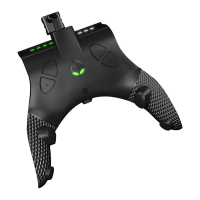
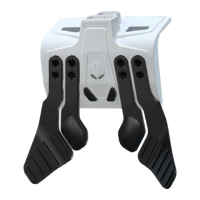
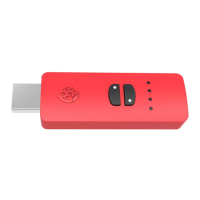
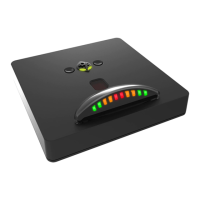
The STRIKEPACK™ Dominator is a wired controller adapter designed for Xbox Series X|S® consoles, enhancing gaming functionality by adding two paddles and essential MODs (Macros On Demand) to an existing controller. This device allows for advanced gaming without permanent modifications or voiding the controller's warranty. It attaches to the controller, connects via a 10ft cable, and offers hundreds of MOD combinations, including Rapid Fire, Drop Shot, and Turbo. Further MOD combinations are available through an optional MOD Pass annual subscription.
Function Description
The STRIKEPACK™ Dominator serves as a breakthrough controller adapter, providing advanced gaming features. It operates in three modes: Tournament Mode, MOD Mode, and GAMEPACK Mode.
- Tournament Mode: This is the default mode when the device is paired, indicated by white Gear Head Eyes. In this mode, users can map buttons to the paddles, but MODs are not allowed.
- MOD Mode: To enter MOD Mode, hold the LEFT MAPPING BUTTON and tap the RIGHT MAPPING BUTTON. The Gear Head Eyes will glow green. This mode enables the use of various controller modifications.
- GAMEPACK Mode: To enter Game Pack Mode, hold the LEFT MAPPING BUTTON and tap the RIGHT PADDLE. The Gear Head Eyes will flash green and white. This mode requires an active MOD Pass subscription.
The device offers a wide array of MODs, categorized into 8 main classes, indicated by LEDs on the device. These classes include:
- Primary Weapon Fire (LED 1): MODs affecting the primary weapon in common shooters, such as Optimized Rapid Fire, Rapid Fire Adjustable, MW Jitter (M1014 Shotgun), Burst Fire Adjustable, and Pulse Fire Adjustable. These can also be assigned to the LEFT Trigger for Akimbo/Dual Wield weapons.
- Secondary Weapon Fire (LED 2): MODs affecting the secondary weapon, with similar options to Primary Weapon Fire. Weapon Swap functionality allows switching between primary and secondary weapon MODs.
- Anti-Recoil Adjustable (LED 3): MODs to decrease vertical recoil while firing, with options like Always On, Scope Enable/Disable, and Inverted Y.
- Quick Scope (LED 4): MODs for quickly zooming in and firing a sniper rifle, including Tap 500ms Adjustable, Press Sensitive Adjustable, and Fully Auto Adjustable.
- Auto Run (LED 5): MODs for continuous sprinting, with Traditional Auto Run, Press Sensitive/CALL OF DUTY® Auto Run, and DESTINY™ Auto Run options. The DESTINY™ Auto Run includes an adjustable wait time to accommodate reload animations.
- Drop Shot (LED 6): MODs for dropping prone or sliding while firing, such as Rapid Fire Drop and Auto Drop.
- Left Paddle MOD (LED 7): Allows applying various MODs (Optimized Rapid Fire, Pulse Fire Adjustable, MW Jitter, Rapid Fire Drop Shot, Reload & Slide, Easy Double Jump, Turbo 2.0 Adjustable) to the Left Paddle for activation.
- Right Paddle MOD (LED 8): Similar to the Left Paddle MOD, allowing the same range of MODs to be applied to the Right Paddle.
Usage Features
- Paddles Mapping: Paddles can be mapped in real-time. To map a paddle, hold the appropriate MAPPING BUTTON and tap the desired button. Releasing both saves the assignment. Multiple consecutive buttons can be mapped to a single paddle.
- MOD MODE Navigation & Basic Control:
- Cycling Classes: Hold LEFT on the D-PAD for 5 seconds, keep LEFT held, and use X (UP) or A (DOWN) to cycle through classes. Top LEDs indicate the selected class.
- Cycling MODs: Keep LEFT on the D-PAD held, and use Y (UP) or B (DOWN) to cycle through MOD numbers. LEFT TRIGGER RUMBLES indicate the selected MOD number.
- Reset Class to Default: Tap the view button.
- Secondary Menu Navigation:
- Adjusting Button Layouts: Hold RIGHT on the D-PAD for 5 seconds to enter the Secondary Menu. This menu is crucial for matching in-game button layouts with the STRIKEPACK™ settings.
- Game Selection: While in Secondary Menu, tap LT to decrease or RT to increase the game number. The RIGHT TRIGGER rumbles to indicate the selected game (COD: WWII/Infinite Warfare, COD: Black Ops 3, Destiny™ Series, Battlefield™ Series, Fortnite™).
- Layout Selection: While in Secondary Menu, tap the menu button to increase the layout number or the share button to decrease it. LEDs flash accordingly. Layouts are saved even after disconnecting the STRIKEPACK™.
- Trigger/Bumper Swap: In Secondary Menu, tap LB to swap triggers with LB/RB Bumpers. LEDs switch to the second two LEDs when swapped. This setting is saved.
- Adjustable MOD Controls: For MODs like Rapid Fire or Anti-Recoil, hold LEFT on the D-PAD, and use RB to increase speed/weight (green LED flash) or LB to decrease (white LED flash). RT can be used for testing.
- Turbo 2.0 Adjustable: The chosen paddle acts as an activator for turbo functionality. Hold the paddle, and any button held simultaneously will turbo. Speed can be adjusted by holding LEFT on the D-PAD, and using RB (increase, green LED flash) or LB (decrease, white LED flash).
- Quick MODs: These are on/off MODs without adjustable settings, activated by D-PAD and controller button combinations. Examples include Easy Double Jump, Auto Hold Breath, Turbo Melee, Auto Spot, Hair Triggers, and Rumble OFF/ON.
- Quick Controls: Allow instant suspension and resumption of active Class/MOD Menu MODs using specific D-PAD and button combinations (e.g., HOLD RIGHT on D-PAD + RT for Primary Fire). LEDs flash white when suspended and green when resumed.
Maintenance Features
- Firmware Updates: It is highly recommended to update to the latest firmware using the Universal Updater Tool available on www.collectiveminds.ca. Connect the STRIKEPACK™ to a PC via the supplied USB cable.
- Updater Mode: To update firmware or make changes in MOD Central software without removing the STRIKEPACK™ from the controller, hold both paddles while connecting the cable to a PC.
- Factory Reset:
- Method 1: Hold both MAPPING BUTTONS together while connecting the cable to a console or PC. Keep them held for at least 5 seconds. The LEDs will flash to confirm.
- Method 2: Download and run the MOD Central software. If the STRIKEPACK™ is attached, hold both paddles while connecting the cable to a PC. If removed, this step is unnecessary. Once detected, navigate to Tools and Factory Reset.
- Troubleshooting: If issues arise or difficulty operating the device, contact support@collectiveminds.ca. Instructional videos are also available on www.collectiveminds.ca and the YouTube support channel.
The STRIKEPACK™ Dominator is designed for user-friendliness and intuitive operation, aiming to provide a seamless and enhanced gaming experience.

 Need help?
 General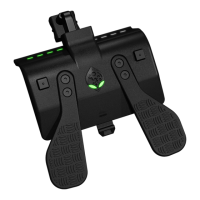

 To Next Page