have completed the “Stranded on Eventide” shrine quest, fast
travel to the “Korgu Chideh Shrine”.
Turn to look at the “Korgu Chideh Shrine” behind you, and
make your left from there towards the cliff. Jump off and glide
onto the island ring of rocks. You will see a chest in the
middle of a pool of water; make sure Link is standing ashore in
line with the chest, and aiming the magnesis ability at the lock
on the chest. There needs to be enough room between Link
and the water for the chest to make it to land.
ENTER MENU MODE - HOLD MINUS button (XB: VIEW / PS:
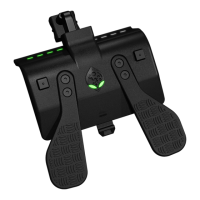
SHARE) until the Mode Select LED turns WHITE.
PRESS the following D-Pad sequence: ↑ ← ↑ →. From top to
bottom, the Switch Up
TM
will light up a GREEN Player LED as
you enter the 4 button code. If you have begun entering the
wrong code, wait for the Player LED's to shut off, and try again.
Once you have entered the code correctly, all 4 Player LED's
will be flashing GREEN in sync. If you have entered the code
incorrectly, the Mode Select LED will light up YELLOW for a
few seconds, and then you can try again.
Once you have entered the code correctly, make sure Link is
still aiming the magnesis ability at the middle of the chest.
PRESS UP D-Pad to toggle ON Arrow Generator. The Mode
Select LED will now flash in sync with the 4 GREEN Player
LED’s. The generator will run endlessly, earning arrows up to
the max limit of your inventory, or until you toggle it OFF.
PRESS MINUS button (XB: VIEW / PS: SHARE) to toggle OFF
Arrow Generator when you are done. The Mode Select LED
will stop flashing and the 4 Player LED’s will shut off. You will
be able to control your game again.


 To Next Page