EasyManua.ls Logo

Collomix Aqix - User Manual

Collomix Aqix
5 pages
Print Icon
To Next Page IconTo Next Page
Loading...
8



9
7
4
5
3
6

Other manuals for Collomix Aqix

Question and Answer IconNeed help?

Do you have a question about the Collomix Aqix and is the answer not in the manual?

Summary

Collomix AQiX Control Elements Overview

Intended Use and Limitations

Usage Restrictions

Outlines prohibited uses, environmental conditions, and pressure limitations.

Safety Information and Precautions

General Safety Warnings

Advises reading instructions, user familiarity, and age restrictions.

Operational Safety Alerts

Highlights critical warnings for freezing, hose connection, and load limits.

Assembly, Commissioning, and Operation

Device Assembly and Commissioning

Instructions for connecting hoses and initial device setup, including venting.

Device Operation Guide

Covers switching on, setting quantities, starting, interrupting, and storing dosing.

Care, Maintenance, and Troubleshooting

Faults and Troubleshooting Guide

Lists display notifications for common faults and their recommended rectifications.

Overview

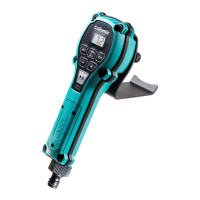
The Collomix AQiX is a water dosing system designed for precise water addition in professional construction settings. It is intended for use by trained personnel to mix building chemical products such as mortar, plaster, screed, concrete, and fillers. The device accurately meters specific amounts of clear freshwater with a temperature up to 40°C. It is not designed for industrial use and must not be used with salt water, chemicals, foodstuffs, spirits, highly flammable or explosive substances, or compressed air, as these can damage the device.

Function Description

The AQiX system allows users to set and dispense precise quantities of water. It features a display (1) and a key field (2) for operation. Users can set a desired metering quantity using the plus/minus buttons (11) in increments of 0.1 litres. Frequently used quantities can be saved to two storage tanks (8, 9) using the "M1" and "M2" buttons. For manual dosing, the "Man/0.00" button (10) allows water to run as long as the button is held down, with the dispensed quantity shown on the display. The device also supports converting units of measure between litres, quarts, and US gallons by holding the "Man/0.00" button for 5 seconds and selecting the desired unit.

The metering process is initiated by pressing the "START/PAUSE" button (12) and can be interrupted and resumed at any point. The device is designed to be held in hand, hung on a mixing bucket, or attached to a mixer, utilizing its retaining bracket (6) and water outlet (7).

Important Technical Specifications

  • Measurable water quantity: 1 - 99 litres
  • Min. / max. operating pressure: 2 - 6 bar
  • Device operating temperature: +5°C - +50°C
  • Flow medium: Clear freshwater
  • Flow speed min. - max.: 10 ltr/min - 25 ltr/min
  • Max. water temperature: +40°C
  • Accuracy: 1-3 litre ± 60 ml, > 31 ± 2%
  • IP protection class: IP 64
  • Batteries: 2 x AA/IEC LR6 1.5 V (alkaline manganese only; rechargeable batteries are not permitted)
  • Weight: 688 grammes
  • Connection thread: 3/4" for hose coupling (4)

The device operates optimally when water pressure is between 2 and 6 bar. It is important to note that this device is not a calibrated meter, and fluctuations can occur due to varying water pressure or other factors.

Usage Features

  • Assembly and Commissioning: The device comes with a standard ½" hose connection, which can be unscrewed and replaced with other tap connections like a bayonet coupling. Standard hose couplings (1/2" or 3/4") can be used. The water hose should only be connected to the hose coupling (4), not the water outlet (7), and should not be pressurized.
  • Venting: After connecting to the water hose, it's crucial to vent the device. This involves switching on the device with the "START/PAUSE" button (12), setting the display to "0" with the "Man/0.00" button (10), and holding the "START/PAUSE" button until water flows out without interruption.
  • Operation: The device is switched on by pressing the "START/PAUSE" button (12). The display first shows the unit (litres, quarts, or gallons) and then the last set quantity.
  • Dosing: Pressing "START/PAUSE" (12) begins metering. The process can be paused and resumed.
  • Storage: Metering quantities can be saved to "M1" (8) or "M2" (9) by setting the desired value, then holding the respective button for 2 seconds until the display flashes. Saved values can be recalled by pressing "M1" or "M2".
  • Manual Metering: Pressing "Man/0.00" (10) and then "START/PAUSE" (12) allows for continuous water flow as long as the button is held.
  • Unit Conversion: To change units, hold "Man/0.00" (10) for 5 seconds until "0__" appears. Use "+" and "-" (11) to set the desired unit (100 = litres, 200 = quarts, 300 = gallons), confirm with "START/PAUSE" (12), and then press Play twice.
  • Mounting: The device can be held manually, hung on a mixing bucket, or mounted on a mixer drum.

Maintenance Features

  • Cleaning: The device should be kept clean, with dirt removed immediately using a damp cloth and mild cleaning detergent (soap). Solvents should not be used.
  • Battery Replacement: The battery compartment (3) cover is opened with a screwdriver. Old batteries are removed, and new AA alkaline manganese batteries are inserted according to the labelling. The rubber seal from the cover should be cleaned, lubricated with silicone grease, and reinserted carefully to ensure a proper fit and maintain leak-tightness.
  • Hose Connection Replacement: The hose connection is loosened by turning counter-clockwise. A new hose coupling with a seal is placed on the thread and tightened clockwise.
  • Screen Cleaning: A particulate screen (5) in the water supply holds back larger particles. It should be cleaned periodically by unscrewing the hose connection, pulling out the screen with pliers, cleaning it under running water, and re-inserting it.
  • Back-flushing: If water flow significantly decreases, the screen before the water outlet (7) needs cleaning. For this, the hose must be connected to the water outlet only, and the screen at the water supply (5) must be removed. The device is then flushed backward to remove deposits. Afterward, disconnect the hose and re-insert the screen at the water supply.
  • Troubleshooting: The device includes display notifications for common issues:
    • "BAT" indicates empty batteries, requiring replacement.
    • A circumferential line indicates no water supply, prompting users to check the water supply and clean the device inlet if dirty.
    • No display notification after pressing "START/PAUSE" suggests changing batteries or, if the issue persists, sending the device for repair.

Decommissioning

To decommission the device, turn off the water supply, completely empty the device, and press the "START/PAUSE" button. Disconnect the water hose and shake out any remaining water. The AQiX should be stored in a dry, closed, and frost-proof location, ideally in its original case, out of reach of children.

Warranty and Service

The manufacturer offers a product warranty in accordance with legal and country-specific regulations. Warranty claims require a payment receipt or delivery note. The device must be returned to Collomix Service in a complete and undismantled state for complaints to be considered. Damage from normal wear, overload, improper handling, non-approved accessories, or insufficient maintenance is exempt from warranty. Repairs by third parties or unauthorized structural/functional changes invalidate the warranty. For repairs, users should contact their dealer or country distributor, or visit www.collomix.com.

Collomix Aqix Specifications

General IconGeneral
BrandCollomix
ModelAqix
CategoryMeasuring Instruments
LanguageEnglish