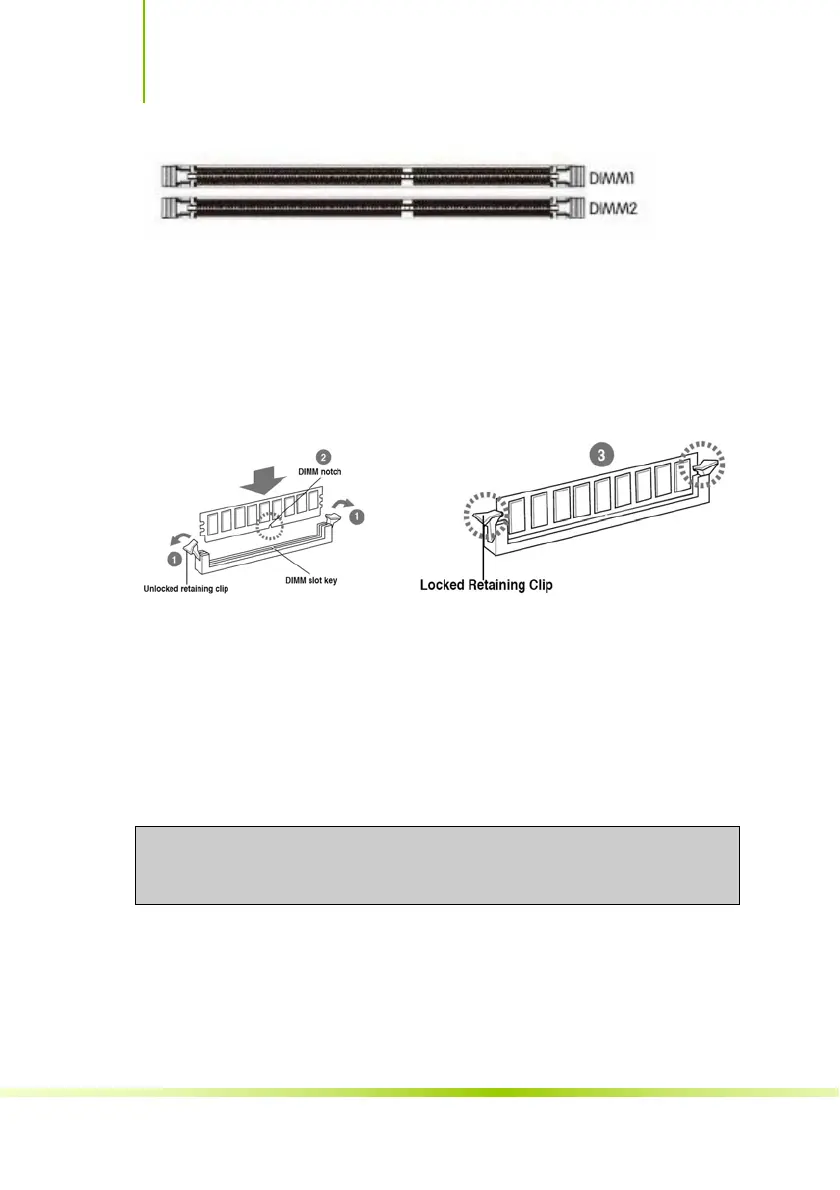
Use the following procedure to install memory DIMMs into the slots on the
motherboard. Note that there is only one gap near the center of the DIMM slot.
This slot matches the slot on the memory DIMM to ensure the component is
installed properly.
9
Unlock a DIMM slot by pressing the module clips outward.
9
Align the memory module to the DIMM slot, and insert the module
vertically into the DIMM slot. The plastic clips at both sides of the DIMM slot
automatically lock the DIMM into the connector.
Installing the Motherboard
The sequence of installing the motherboard into the chassis depends on the
chassis you are using and if you are replacing an existing motherboard or
working with an empty chassis. Determine if it would be easier to make all the
connections prior to this step or to secure the motherboard and then make all
the connections. Use the following procedure to install the I/O shield and
secure the motherboard into the chassis.
Be sure that the CPU fan assembly has enough clearance for the chassis
covers to lock into place and for the expansion cards. Also make sure the CPU
Fan assembly is aligned with the vents on the covers.
Installing the I/O Shield
The motherboard kit comes with an I/O shield that is used to block radio
frequency transmissions, protects internal components from dust and foreign
objects, and promotes correct airflow within the chassis.
Before installing the motherboard, install the I/O shield from the inside of the
chassis. Press the I/O shield into place and make sure it fits securely. If the
战斧 B365M-HD PRO V21/BATTLE-AX B365M-HD PRO V21
32








 To Next Page