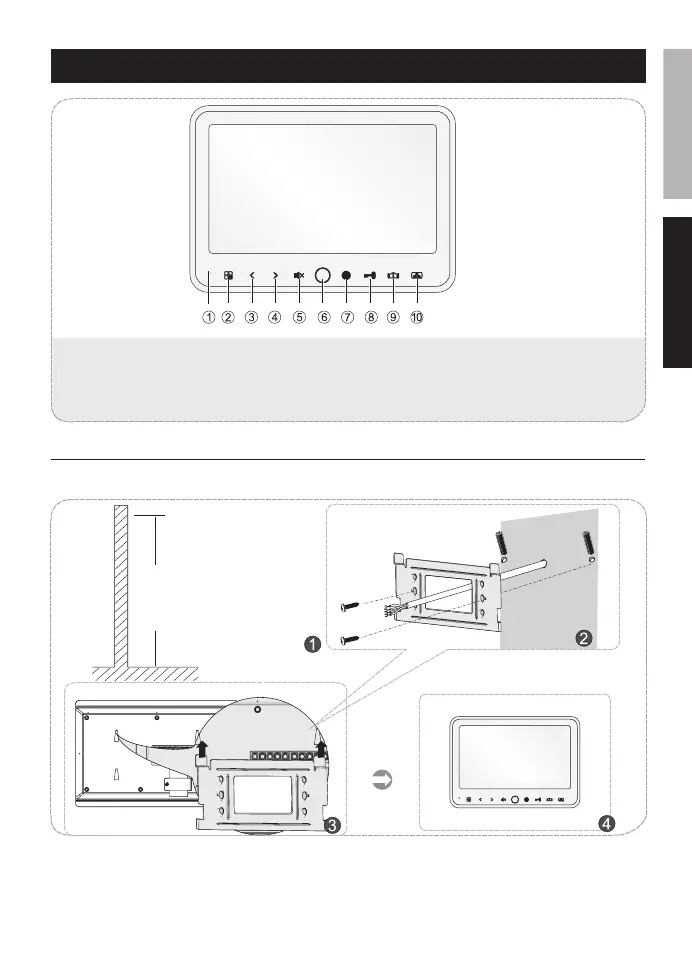
Icon Introduction
Depend on user’s height
1 Microphone
2 MENU Button
3 Left Button/
Adjust the ring volume
4 Right Button/
Setting the bell tone
5 Mute Button
6 Mute indicator LED
7 Internal call button
8 Unlock button
9 Unlock button
10 Intercom/Monitor Button
1. Choose a suitable place.
2. Mount backing plate of indoor-monitor by drilling holes in the wall, and screwing the backing plate
rmly, making provision for the cable to pass through.
3. Connect the wires to screw terminals as per diagram.
4. Insert the bracket into the slots of indoor-monitor.
FREN


 To Next Page