6
ACCESSING AND NAVIGATING MENUS
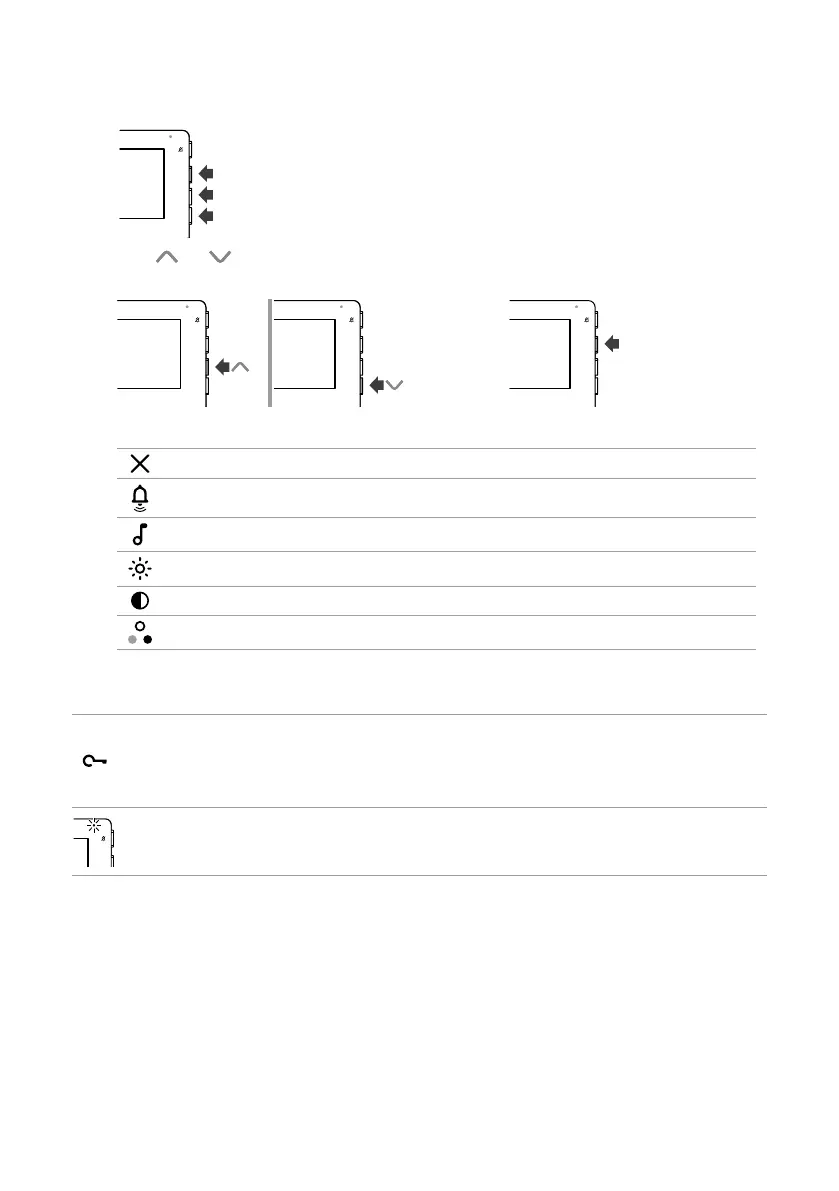
f Press one of the buttons below to access the user menu.
f Press and to scroll through the menu and/or select the values, then press the confirm button to
confirm the selection.
OK
User menu options
Exit
Call volume adjustment
Select ringtone upon call from external entrance panel
Brightness control
Contrast adjustment
Colour adjustment
Indicator LEDs
White LED
Flashing: incoming call/communication taking place.
Flashing with door entry monitor in standby: “Door open” indication.
Lit steadily with door entry monitor in standby: “Automatic lock-release on receipt
of call” mode enabled.
Red LED
4 flashes: system busy.
Lit steadily: silent mode enabled










 To Next Page