5
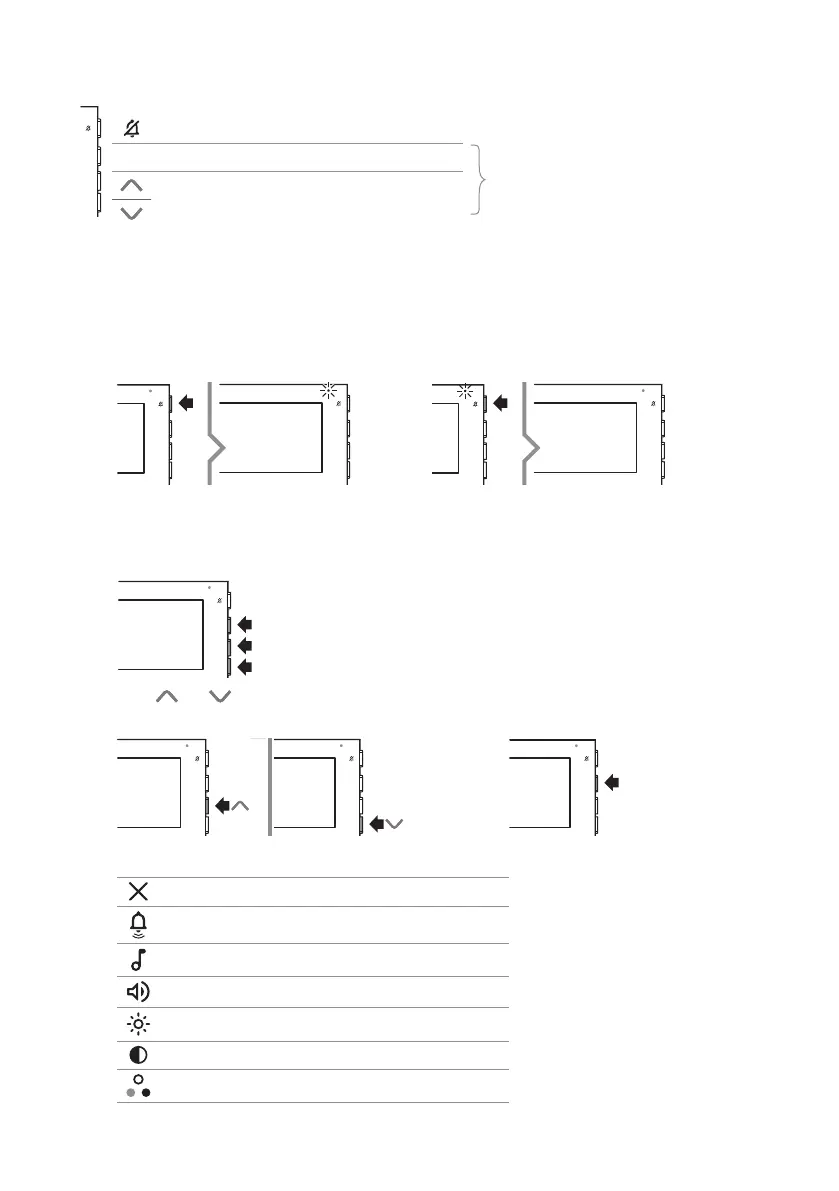
Side buttons
Button for activating “Silent mode”
OK Confirm button
Menu access and navigation button
Buttons for scrolling menus and selecting
values
ACTIVATING “SILENT MODE”
Silent mode can be used to exclude the ringtone on receipt of a call from the outdoor entrance panel and from
the switchboard.
f Press the button to activate/deactivate Silent mode.
» The red LED indicates that the function is active.
ACCESSING AND NAVIGATING MENUS
f Press one of the buttons below to access the user menu.
f Press and to scroll through the menu and/or select the values, then press the confirm button to
confirm the selection.
OK
User menu options
Exit
Call volume adjustment
Select ringtone upon call from external entrance panel
Audio volume adjustment
Brightness control
Contrast adjustment
Colour adjustment











 To Next Page