P.6
●
About Error Messages
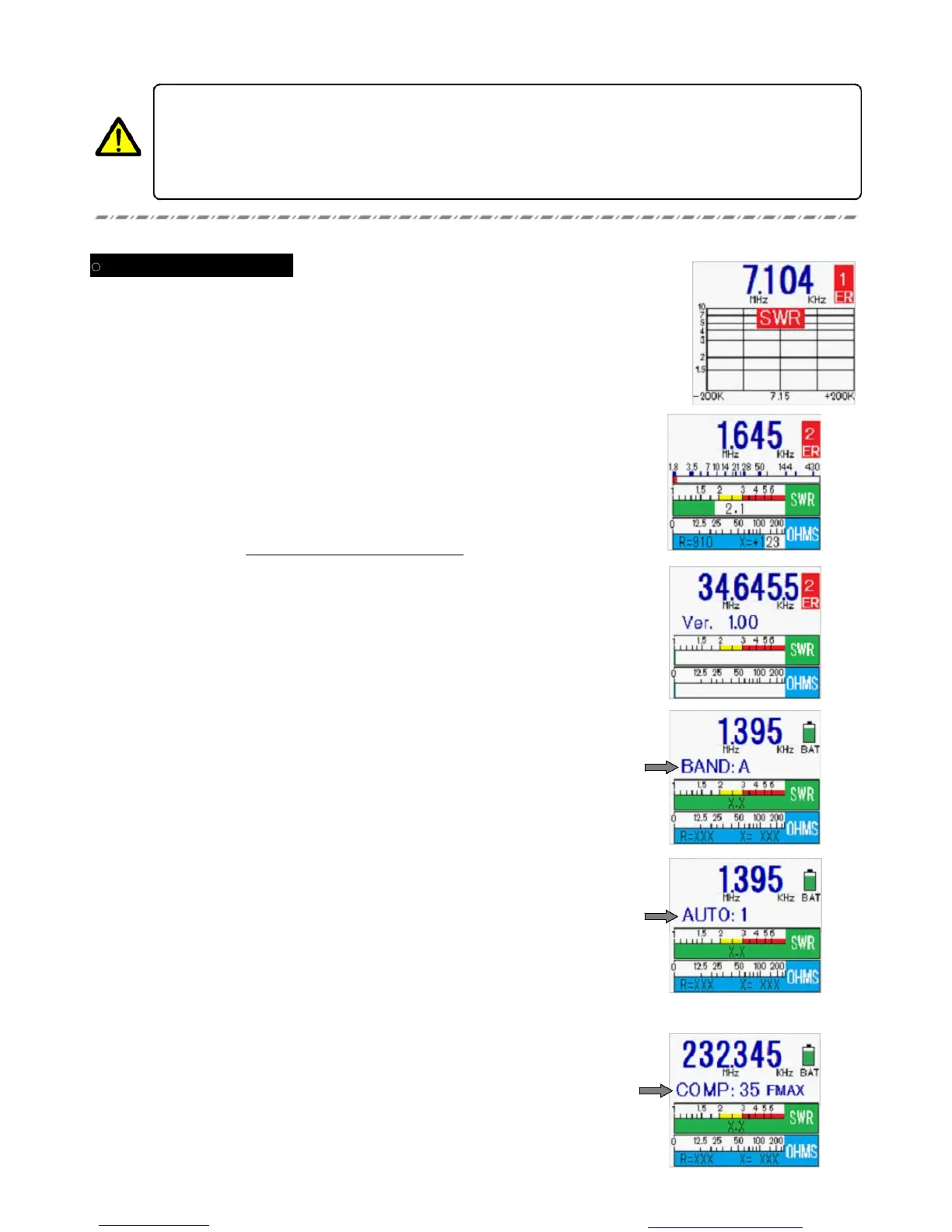
If an error occurs during Sweep operation, an error message will appear at the top right. In this
case, ER1 indicates that the frequency of interest could not be set.
Frequently, very strong local RF fields can cause erratic meter operation and/or incorrect SWR
readings. Try to eliminate the strong RF fields and try again.
If ER1 appears even with no antenna connected, there may be an internal malfunction in
the meter. Contact your dealer for repair assistance.
Flash Dara Recovery Procedures
4
.
Press the CENTER key. An automatic adjustment process will begin; you will notice a number incrementing
upward.
6. Now turn the CA-500 MarkII off.
Be certain to turn the charging slide switch to OFF when using alkaline cells!
If you neglect to turn this switch off, and attempt to charge alkaline cells, battery leakage may
occur, which can cause serious damage to this unit (not covered by our Limited Warranty).
Also, do not use a combination of alkaline and Ni-MH batteries, as damage can occur in case of
an unexpected accident.
If ER2 appears immediately aftger powering up the unit, it means
that the internal flash data is corrupted.
1
.
Press and hold in the GRAPH ON/OFF key; while holding it in, press
the POWER key to turn on the CA-500 MarkII.
・
Release the GRAPH ON/OFF key when prompted.
・
The version number for the unit’s firmware will; now appear on the LCD.
2. Now press the GRAPH ON/OFF key.
[BAND A] will be displayed.
3
.
Press the GRAPH ON/OFF key again. [AUTO: 1] will be displayed.
・
Set the FREQ knob to the center of its range.
・
Do not move the FREQ knob hereafter during this procedure.
5
.
After about two minutes, [COMP: 35 will be displayed. The procedure
is now complete.
You created this PDF from an application that is not licensed to print to novaPDF printer (http://www.novapdf.com)


 To Next Page