

EasyManua.ls Logo

Comfast CF-WR758AC - User Manual

Comfast CF-WR758AC
62 pages
Print Icon
To Next Page IconTo Next Page
Loading...
CF-WR758AC
User Manual • Uživatelský manuál •
Užívateľský manuál • Használati utasítás •
Benutzerhandbuch Manuel d'utilisation
Question and Answer IconNeed help?

Do you have a question about the Comfast CF-WR758AC and is the answer not in the manual?

Summary

Product Overview

Product Structure and Components

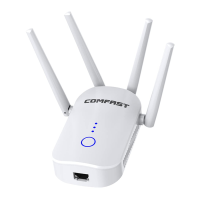
Overview of the device's physical components, including ports, indicators, and buttons.

Simple Installation and Setup Guide

Operating Modes

Bridge Mode Configuration

Configure bridge mode settings within the advanced mode for enhanced network control.

AP Mode Configuration

Configure AP mode, set IP addresses, and connect devices wirelessly.

Routing Mode Configuration Options

PPPoE Internet Connection

Configure PPPoE settings with provider details for internet access.

Static IP Internet Connection

Set static IP, subnet mask, gateway, and DNS for network service.

Dynamic IP Internet Connection

Obtain IP automatically from the superior network device for internet access.

Frequently Asked Questions

WiFi Extender Functionality and Placement

Understand the extender's function and optimal placement for signal coverage.

Troubleshooting: Resetting and Disconnections

Learn how to reset the device and resolve common disconnection issues.
Warranty Conditions

EU Declaration of Conformity

WEEE Disposal Instructions

Summary

Product Overview

Product Structure and Components

Overview of the device's physical components, including ports, indicators, and buttons.

Simple Installation and Setup Guide

Operating Modes

Bridge Mode Configuration

Configure bridge mode settings within the advanced mode for enhanced network control.

AP Mode Configuration

Configure AP mode, set IP addresses, and connect devices wirelessly.

Routing Mode Configuration Options

PPPoE Internet Connection

Configure PPPoE settings with provider details for internet access.

Static IP Internet Connection

Set static IP, subnet mask, gateway, and DNS for network service.

Dynamic IP Internet Connection

Obtain IP automatically from the superior network device for internet access.

Frequently Asked Questions

WiFi Extender Functionality and Placement

Understand the extender's function and optimal placement for signal coverage.

Troubleshooting: Resetting and Disconnections

Learn how to reset the device and resolve common disconnection issues.

Warranty Conditions

EU Declaration of Conformity

WEEE Disposal Instructions

Comfast CF-WR758AC Specifications

General IconGeneral
BrandComfast
ModelCF-WR758AC
CategoryRepeater
LanguageEnglish

Related product manuals