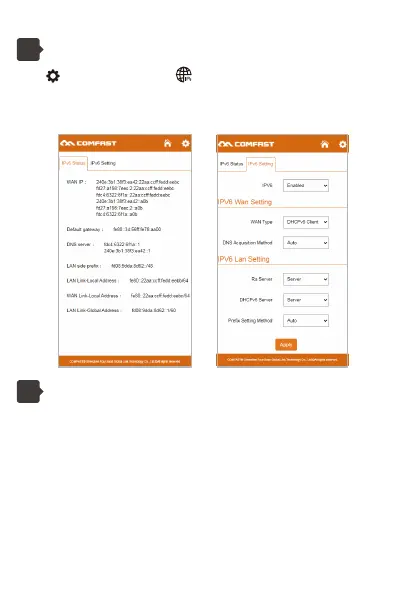
Click and select to enter the IPv6 setting page.
IPv6 Status: Displays the information about the IPV6 address obtained by
the device.
IPv6 Setting: Set the IPV6 LAN and WAN information.
IPv6 Setting
4
Precautions:
1. The Mesh controller node needs to be enabled in Router mode or AP
mode. It is recommended to use it in Router mode.
2. The Mesh network consists of a management node and at least one
agent node.
3. After enabling Mesh, you need to click the "Trigger EasyMesh" button on
the two node pages to pair Mesh.
4. The Mesh pairing process takes about 2 minutes. After 2 minutes, go to
the management node page, you can view the status of Mesh.
5. If the Mesh is not formed successfully. Try pairing again after clicking the
"Restore EasyMesh to Default" button on the Mesh settings page.
Mesh Setting
5


 To Next Page
 Loading...