EasyManua.ls Logo

Comfast WR302S - User Manual

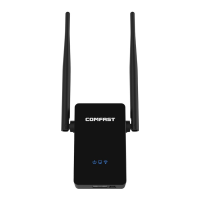
Comfast WR302S
32 pages
Print Icon
To Next Page IconTo Next Page
Loading...
WR302S
USER MANUAL
EN
CZ
SK
HU
DE
2 – 6
7 - 13
14 19
20 26
27 32
The product user guide contains product features, uses and operating procedures. Read
the user manual carefully to get the best experience and avoid unnecessary damage.
Keep this manual for future reference.Strictly comply with applicable laws and
regulations at the place of use.
Importer: Alza.cz a.s., Jankovcova 1522/53, 170 00 Prague 7, www.alza.cz
Question and Answer IconNeed help?

Do you have a question about the Comfast WR302S and is the answer not in the manual?

Summary

Product Description

Structure Description

Details the physical layout and components of the WiFi repeater, including indicators and ports.

WPS;Reset Functionality

Explains the operation of the WPS/Reset button for automatic setup and factory resets.

General Safety Warnings

Lists essential precautions for safe operation, placement, and protection from damage.

Product Installation

WPS Automatic Setup

Details the WPS 'one key to repeater' method for automatically extending WiFi signal range.

Input IP Setting

Manual IP Configuration

Step-by-step guide to connect via IP address 192.168.10.1 and log in for device configuration.

WiFi Extension and Troubleshooting

WiFi Extension Steps

Guides users through selecting a WiFi, entering the password, and confirming successful extension.

Advanced Features via PC

Details accessing advanced modes like AP or router mode through a PC connection.

Common Troubleshooting Issues

Addresses common problems like no internet access and slow network speeds after setup.

Warranty and Compliance

Warranty Conditions

Details the 2-year warranty and conditions that may invalidate a claim.

WEEE Disposal Information

Provides instructions for proper disposal of the electronic device according to EU regulations.

Summary

Product Description

Structure Description

Details the physical layout and components of the WiFi repeater, including indicators and ports.

WPS;Reset Functionality

Explains the operation of the WPS/Reset button for automatic setup and factory resets.

General Safety Warnings

Lists essential precautions for safe operation, placement, and protection from damage.

Product Installation

WPS Automatic Setup

Details the WPS 'one key to repeater' method for automatically extending WiFi signal range.

Input IP Setting

Manual IP Configuration

Step-by-step guide to connect via IP address 192.168.10.1 and log in for device configuration.

WiFi Extension and Troubleshooting

WiFi Extension Steps

Guides users through selecting a WiFi, entering the password, and confirming successful extension.

Advanced Features via PC

Details accessing advanced modes like AP or router mode through a PC connection.

Common Troubleshooting Issues

Addresses common problems like no internet access and slow network speeds after setup.

Warranty and Compliance

Warranty Conditions

Details the 2-year warranty and conditions that may invalidate a claim.

WEEE Disposal Information

Provides instructions for proper disposal of the electronic device according to EU regulations.

Comfast WR302S Specifications

General IconGeneral
BrandComfast
TypeWireless Router
Frequency Band2.4GHz
Max Wireless Speed300Mbps
LAN Ports4 x 10/100Mbps
WAN Ports1 x 10/100Mbps
Wireless StandardIEEE802.11n
SecurityWPA/WPA2
Operating ModeAP/Router/Repeater/WISP

Videos

How to Easily Set Up Your Comfast CF-WR302S WiFi Extender

How to Reset Your Comfast CF-WR302S WiFi Extender

Related product manuals