5
Controller Instrucons
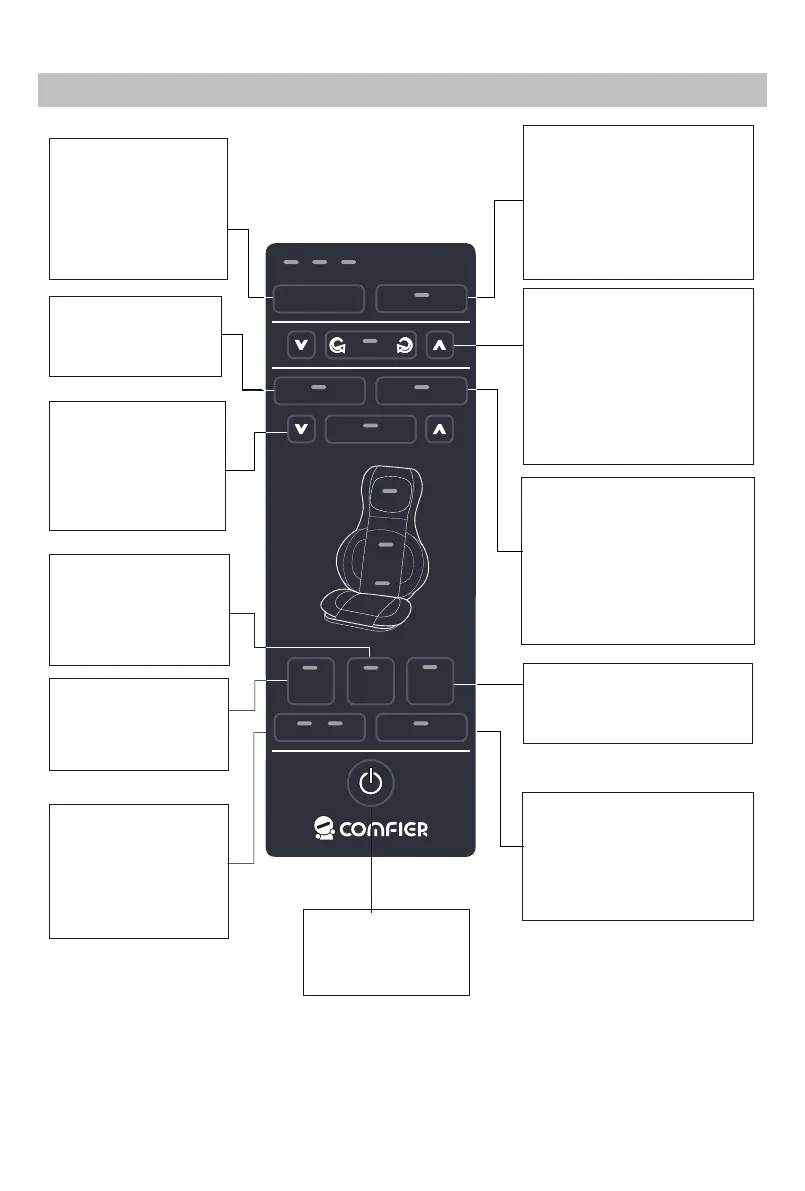
Vibraon Buon:
Press to turn on the
seat Vibraon, you
may cycle through
High,Medium,Low
or off sengs
Press arrow buons to adjust
the shiatsu nodes posion up
or down
Back Shiatsu Buon:
Press to shi 2D/3D
shiatsu style.
Spot Buon:
Press to keep shiatsu
funcon in one area.
Press arrow buons to
adjust the shiatsu nodes
posion up or down.
Shiatsu Area Buon:
Select Full, Upper or
Lower back to
designate the area
covered by the shiatsu
massage.
Power Buon:
Press to turn on or
off the massager
Demo Buon:
Quick demonstraton of the
different funcons. The L.E.D.
lights will blink to indicate the
acve funcons. Once
complete, the device will
automatcally turn off.
Back Heat Buon:
Press to turn on or off Heat
The heat can’t be acvated
if back shiatsu funcon is not
turned on
Neck Shiatsu Buon:
Press to turn on Shiatsu neck
massage, Press again to shi
rotaon direcon, Press once
again to turn off
Rolling Buon:
press to acvate Rolling
funcon, the massage nodes
travel up & down across the
muscle gently. Connue
pressing the buon to adjust
the width of the massage
nodes to custom fit the body.
Air Seat Buon:
Press to turn on or off air
massage on the seat
Timer
Heat
Neck
Shiatsu Rolling
Spot
Full
Back
Upper
Back
Lower
Back
HeatVibration
1 2 3
2D/3D
Rolling
Spot
Neck
Full/Upper/Lower Back
Air
Back
Air
Seat
Air
intensity
Vibration
Demo
Heat
Air Back Buon:
Press to turn on or
off air massage on
the back
Air Intensity Buon:
Press to set both air
massage intensity at
Low,Medium or
High level


 To Next Page