User Manual Careleda P/L M-03 WI-364rev0 Edited 26.02.2020 19 | P a g e
CAREFULLY READ AND UNDERSTAND INSTRUCTIONS BEFORE USING CHAIR
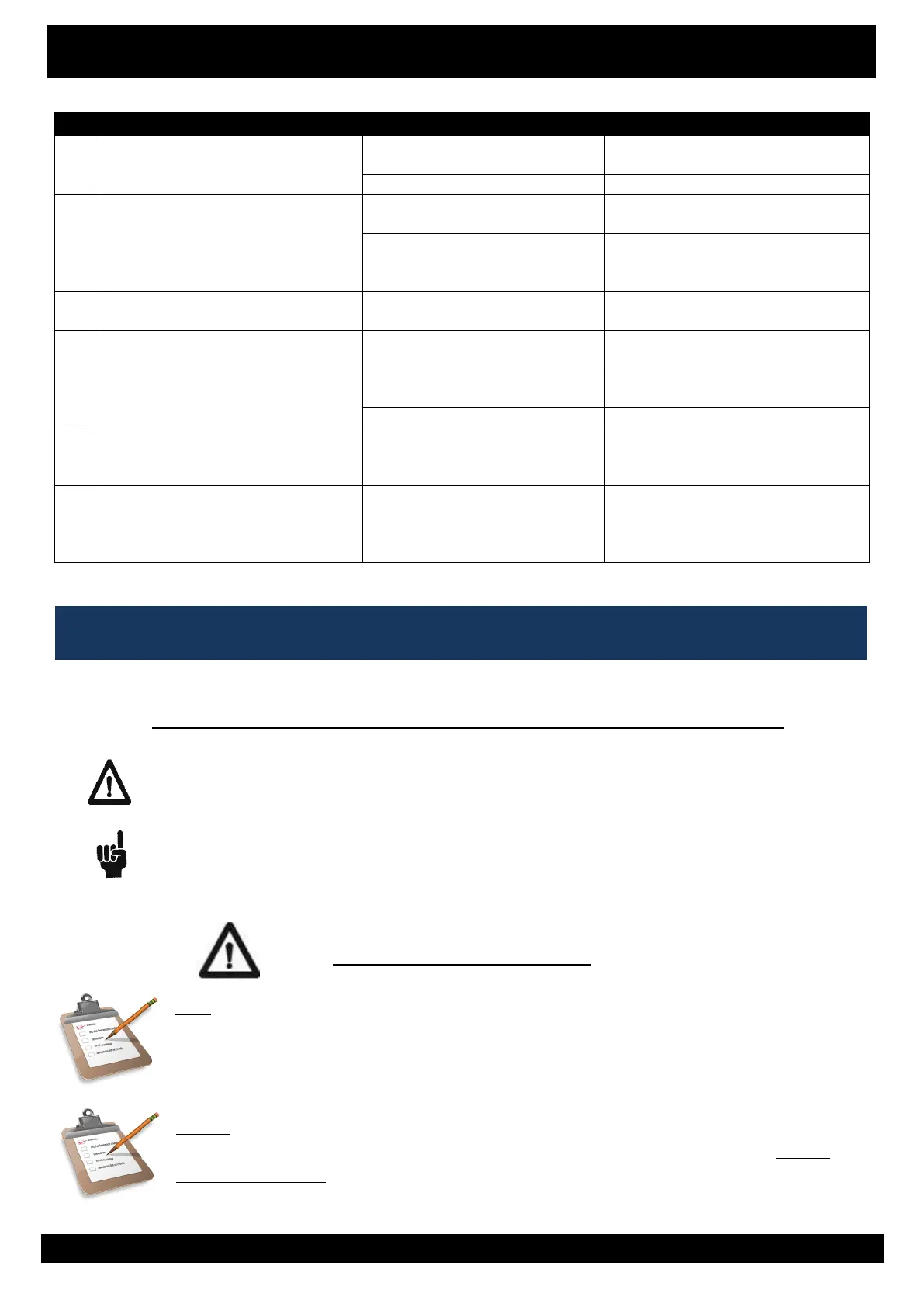
Control Box functions okay apart from
one direction
- Replace handset or send handset for
repair
- Control box/panel defective
- Send control box for repair or replace
Actuator will not drive IN or OUT.
Intermittent beeping from the control
box when button is pressed
- Electronics need resetting
- Perform the Reset/Initialisation
procedure
- Cable to the actuator is either
disconnected or faulty.
- Reconnect or replace the faulty
component
- Replace actuator or send for repair
One or more actuators stop while
operating them
Reduce or remove load on the chair
and try again
HILO columns will not drive IN or OUT
(if applicable)
- Electronics need resetting
- Perform the Reset/Initialisation
procedure
- Cable to column is disconnected
or Faulty.
- Reconnect or replace the faulty
component
- Replace column or send for repair
POSITION LOST on an actuator is
indicated via an intermittent beep
200msec ON / 200msec OFF.
If problem persists, locate faulty
actuator or cable and replace.
Try the RESET/INITIALISATION
procedure, and then in turn run all
functions.
FATAL ERROR is indicated via an
intermittent beep 50msec ON /
500msec OFF.
If problem persists, locate faulty
actuator/cable and replace. This
could also be caused by CB6/CU20
problems, replace as required.
Try the RESET/INITIALISATION
procedure, and then in turn, run all
functions.
DESCRIPTION OF THE VARIOUS SIGNS USED IN THIS MANUAL
Warning!
Failure to comply with these instructions may result in accidents involving serious personal
injury.
Failing to follow these instructions can result in the product being damaged or
destroyed.
GENERAL MAINTENANCE
Daily - A daily visual inspection should be performed by any staff member that is going to use
the chair. This is to make sure that the chair is in a safe operating condition. If there are any
features/items that require attention that may affect the safety of the the client or carer, the
chair should be removed from service until these issues have been rectified.
Weekly – Upholstery cleaning and maintenance must be carried out weekly (minimum) to
ensure longevity and hygienic conditions are maintained. Please refer to section titled General
Cleaning Instructions for recommended cleaning practices.
7. CLEANING & MAINTENANCE
6. Troubleshooting Guide - Electronics
6. Troubleshooting Guide - Electronics


 To Next Page
 Loading...