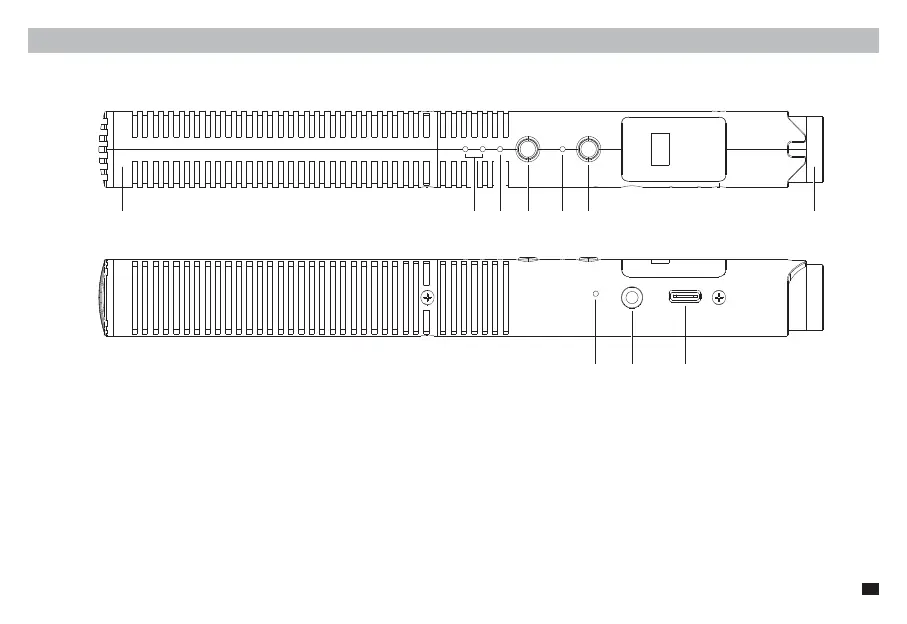
Microphone (Transmitter)
Components and Instruction
1. Mic Capsule
2. Low Cut Indicator: Corresponding indicator lights up blue when turned on
3. High-frequency Boost Indicator: Blue light on when turned on
4. Modes Switch Button: Short press to switch between 75/150Hz low-cut and high-frequency boost functions; Long press to turn on Safety Mode (Safety
Mode is only available in wired mode)
5. Working Indicator: Green light on in wired mode; In wireless mode, blue light flashes when paring, and blue light on when paired
6. RF Button: In wireless mode, long press to turn on/o microphone; in wired mode, long press to turn on/o wireless mode
7. Gain Control Knob: Rotate to adjust microphone gain
8. Pairing Hole: When the wireless connection is abnormal, use the pin to short-press the pairing hole to re-pair
9. 3.5mm Output Port: Support TRS and TRRS output
10. USB-C Charging/Output Port: Plug in the 2 in 1 charging&output cable to charge or output digital audio
① ② ③ ④ ⑤ ⑥ ⑦
⑧ ⑨ ⑩
3



 To Next Page