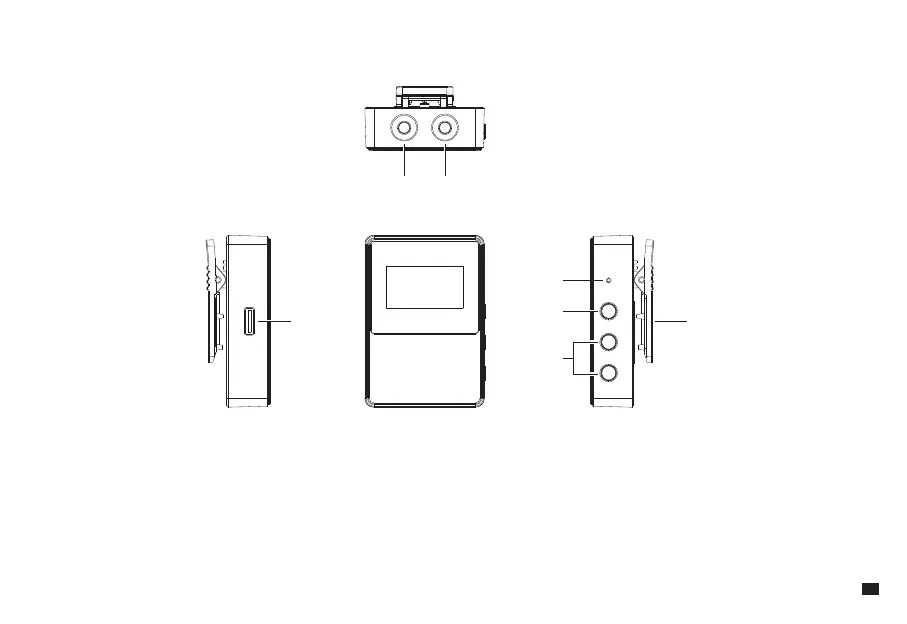
Receiver
1. 3.5mm Monitoring Port: Plug in 3.5mm TRS/TRRS headphones for monitoring
2. 3.5mm TRS Audio Output Port: Connect to camera/smartphone/computer via 3.5mm audio cable
3. USB-C Charging Port: Charging with the 2 in 1 charging&output cable
4. Reset Hole: If there is an abnormal phenomenon such as the device is crash or unable to turn on it, then insert the reset pin into the reset hole to reset it
5. Power/Mute Button: Long press to power on/o; Short press to turn on/o the mute function
6. Gain Control/Screen Flip Button: Short press to adjust the gain; Long press to flip the screen
7. Belt Clip
① ②
③ ⑦
④
⑤
⑥
5



 To Next Page