User Manual for Composite/Stereo-Audio Matrix COMM-TEC MTX series
COMM-TEC GMBH www.comm-tec.de
4 of 12
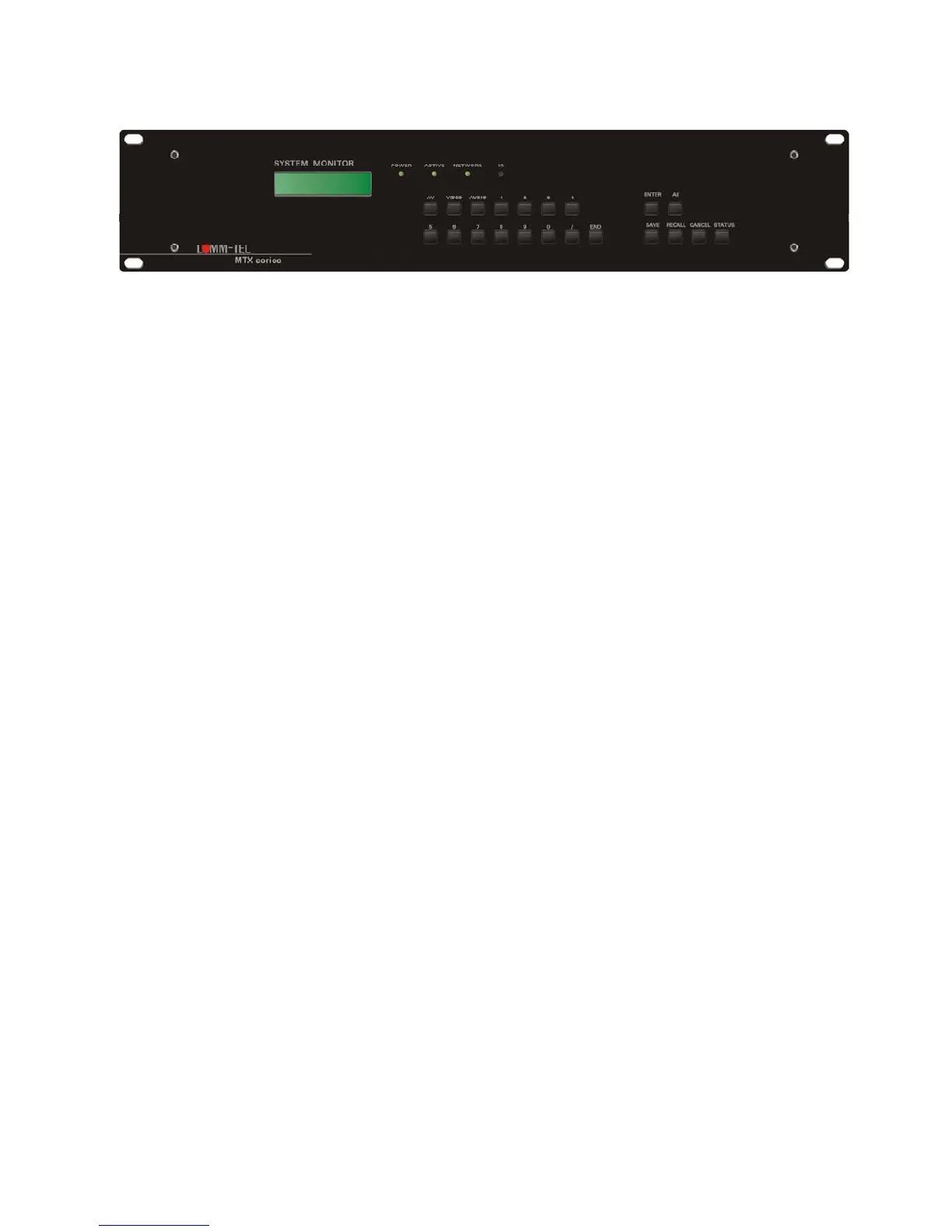
2.3 Front Panel
Button/*Indication Function
COMM-TEC
MTX0804CA V2.6
The LCD-Display shows the entered commands and messages
(status, acknowledgement, errors, prompt, matrix model and firmware)
0 - 9 Number entry for I/O selection, save and recall of presets
AV Audio-follows-Video switching
VIDEO Break-Away, only Video part is switched
AUDIO Break-Away, only Audio part is switched
/ separates different numbers in one command
END Finishes command entry
ENTER Executes command
ALL
Option: one input to all outputs, inputs are switched to outputs with the same number or
disconnect of all routings
SAVE Saves present configuration in a preset (number entry required)
RECALL Recall of a preset (number entry required)
CANCEL Deletes last entry or/and returnes to standby status
STATUS Shows the present Video- and Audioroutings in the LCD display
*THROUGH Inputs are switched to outputs with the same number: 1 to 1, 2 to 2,....
*CLOSE Disconnect all crosspoints/routings



 To Next Page