4
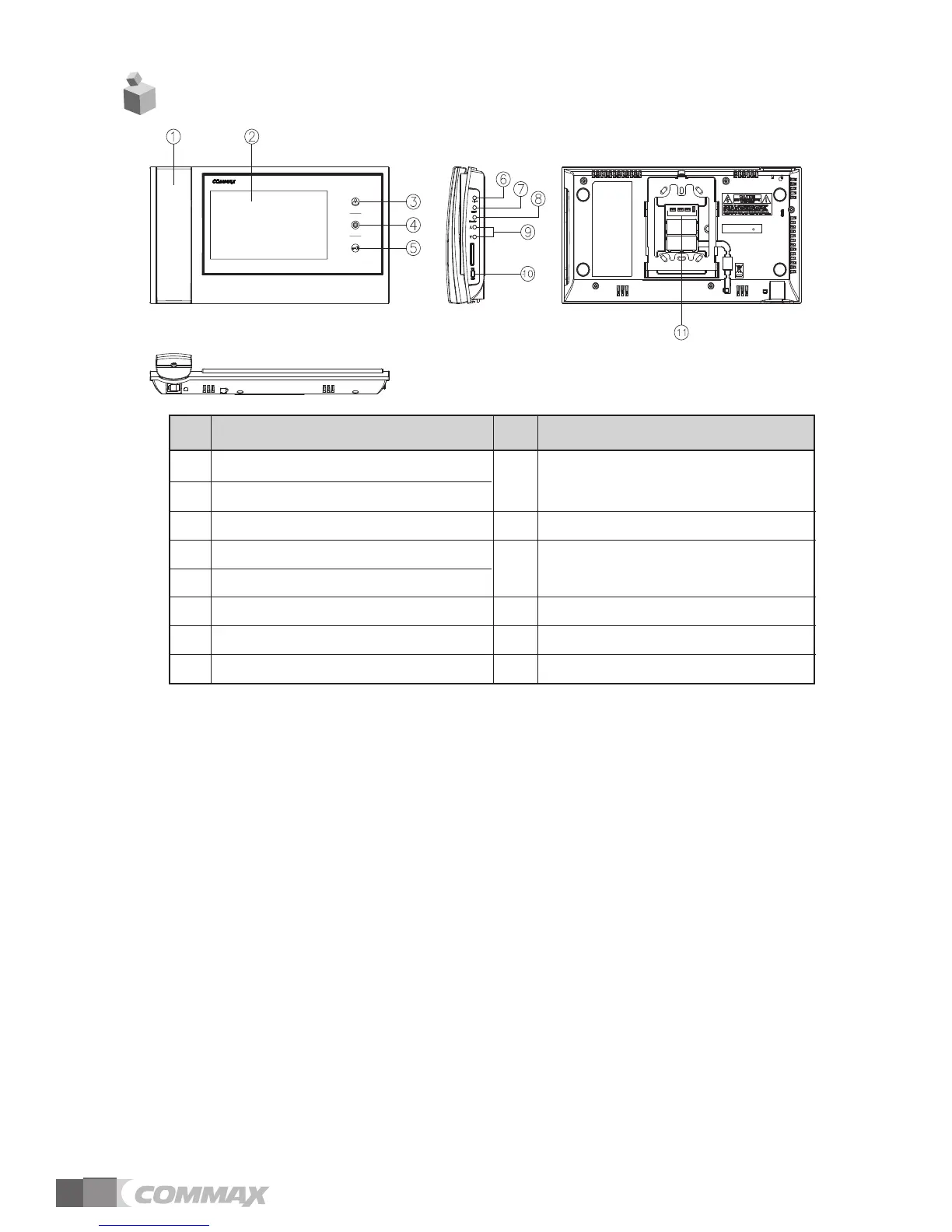
① HANDSET
②
MONITOR: The image of visitor is shown.
③
MONITOR BUTTON(ENTRANCE) : Check the situation of entrance.
④
INTERPHONE BUTTON : Call the interphone.
⑤
DOOR RELEASE BUTTON : Release the door for visitor.
⑥
RINGTONES VOLUME : Adjust the ringtones volume.
⑦
MENU BUTTON
To enter the menu for screen control, mute setting and product information.
⑧
SELECT(SELECT BUTTON): Press to select an item from the menu.
⑨
UP BUTTON : Move from the menu items to up and right.
DOWN BUTTON : Move from the menu items to down and left.
⑩
POWER SWITCH : Turn your device on and off.
⑪
EXTERNAL CONNECTION TERMINAL : For product update and connection
between lobby and interphone.
Description
1 HANDSET UP BUTTON(△) /
2 MONITOR DOWN BUTTON(▽)
3 MONITOR BUTTON 10 POWER SWITCH
4 INTERPHONE BUTTON EXTERNAL CONNECTION
5 DOOR RELEASE BUTTON TERMINAL
6 RINGTONES VOLUME
7 MENU BUTTON
8 SELECT BUTTON
No. DescriptionNo.
2. Product Overview
9
11



 To Next Page