
 Need help?
Do you have a question about the commercial cool CCP6JB and is the answer not in the manual?
Basic safety precautions for using electrical appliances.
Safety precautions when handling alkaline batteries.
Electrical requirements and grounding for safe operation.
Information on the Leakage Current Detection and Interruption power cord.
Instructions to prevent injury and property damage.
Recommended temperature ranges for different operating modes.
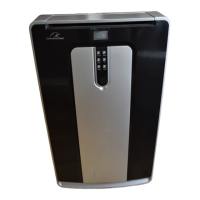
Identifies all components and accessories of the air conditioner.
Technical details including dimensions and electrical requirements.
Guidance on proper placement for noise and efficiency.
Instructions for installing the window slider kit.
Steps for connecting and installing the air exhaust hose.
Overview of the control panel buttons and indicators.
How to turn on the unit and select modes using the control panel.
Explains Cool, Dehumidify, Fan, and Heat modes.
How to set the auto start and auto stop timers.
Explanation of the Sleep indicator light.
Guide to installing batteries in the remote control.
Details on the functions of each button on the remote control.
Explanation of symbols and indicators on the LED display.
Operation of Power, Mode buttons, and Cool mode settings.
Details on Dehumidify, Fan, Heat modes, and Swing function.
How to set timers and activate the sleep function.
How to switch between Celsius and Fahrenheit temperature units.
Guide to connecting and operating the air conditioner via the JHS Smart app.
Steps for selecting the device and entering WiFi credentials.
How to control the unit's functions via the smart app.
Using the app for fan speeds, schedules, and other functions.
Sharing app functions and understanding unit protection features.
Instructions for draining water in Cooling and Heat modes.
How to clean the exterior of the air conditioner.
Steps for cleaning the air filter for efficient operation.
Checks and operations for the start and end of the season.
Initial checks to perform if the air conditioner fails to operate.
Contact information and requirements for customer service and warranty.
Table listing common problems, causes, and remedies for the unit.
Details of the product's warranty coverage, exclusions, and obtaining service.
 General
| Brand | commercial cool |
|---|---|
| Model | CCP6JB |
| Category | Air Conditioner |
| Language | English |


 To Next Page