The Commlite CM-EF-EOS R is an electronic AF lens mount adapter designed to connect Canon EF/EF-S lenses to Canon EOS R RF-mount full-frame cameras. This adapter aims to provide a professional shooting experience by enabling multiple functions that bridge the compatibility gap between these different lens and camera systems.
Function Description:
The primary function of the CM-EF-EOS R adapter is to allow Canon EF/EF-S series lenses to be used on Canon EOS R series cameras. It achieves this by providing electronic communication between the lens and the camera, enabling several key features:
- EXIF INFO. Transmitting Function: The adapter supports the transmission of EXIF data from the lens to the camera. This means that important information such as aperture, focal length, and other shooting parameters will be recorded in the image file, just as if a native RF lens were used. This is crucial for post-processing and cataloging images.
- Auto-focus Function: One of the most significant features is its support for auto-focus. This allows photographers to continue using their existing EF/EF-S lenses with the auto-focus capabilities of their EOS R camera, ensuring sharp and accurate focus for various shooting scenarios.
- Electronic Aperture Control: The adapter enables electronic control of the lens aperture directly from the camera body. This means users can adjust the aperture settings through the camera's controls, maintaining full creative control over depth of field and exposure.
- IS Image Stabilization Function: For lenses equipped with Image Stabilization (IS), the CM-EF-EOS R adapter supports this function. This allows photographers to benefit from the built-in stabilization of their EF/EF-S lenses, reducing camera shake and enabling sharper images, especially in low-light conditions or when shooting handheld.
Important Technical Specifications:
- Compatible Lens: Canon EF/EF-S Series Lens. (For specific compatible camera models, users are advised to check the official Commlite website for a compatibility table.)
- Compatible Camera: Canon RF-Mount Camera. (Again, a compatibility table on the official website is recommended for specific models.)
- Front Installation: EF/EF-S Series Lens.
- Back Installation: Canon RF-Mount Camera Body.
- Camera-Mount Outer Diameter: 50mm.
- Lens-Mount Outer Diameter: 65mm.
- Length: 29mm.
- Net Weight: 175g.
- Material: All-aluminium alloy manufacturing, ensuring a stable and durable construction.
- Contact Points: Gold-plated contacts for reliable electronic signal transmission.
- Tripod Foot: Detachable 1/4 tripod foot, providing flexibility for mounting the camera and lens assembly onto a tripod, especially useful when using heavier lenses to balance the setup and reduce strain on the camera's lens mount.
Usage Features:
- Assembly and Disassembly:
- Connecting EF/EF-S Lens to Adapter: To connect an EF/EF-S lens, press the "Lens Release Button" on the adapter, align the red mark on the lens with the corresponding mark on the adapter, and turn clockwise until it tightens.
- Connecting Adapter to RF-Mount Camera: To connect the adapter (with lens attached) to an RF-Mount camera, press the "Lens Release Button" on the RF-Mount camera, align the marks, and turn clockwise until it tightens.
- Disassembling from RF-Mount Camera: First, turn off the camera. Press the "Lens Release Button" on the RF-Mount camera, and turn the adapter (with lens) counterclockwise until it can be easily removed.
- Disassembling EF/EF-S Lens from Adapter: Press the "Lens Release Button" on the adapter, and turn the lens counterclockwise until it can be easily removed.
- AF Mode Setting: After installing the adapter, if auto-focus is required, ensure the lens is set to AF mode.
- Handling Heavier Lenses: When using lenses heavier than the camera, it is recommended to hold the camera tightly, especially during moving shots, to maintain stability and prevent undue stress on the camera mount. The detachable 1/4 tripod foot can also be utilized for better support with heavier setups.
- Troubleshooting Incompatible Lenses/Cameras: In cases of incompatibility or if the camera displays messages like "Incorrect installation of lens," users can try using the adapter as a manual adapter. Additionally, setting the camera's menu mode to "Release Shutter without Lens" or "Shutter Priority" might resolve some issues.
Maintenance Features:
- Durable Construction: The adapter is made of an all-aluminium alloy, which contributes to its robust and durable nature, designed for long-term use.
- Gold-plated Contacts: The gold-plated contacts are resistant to corrosion and ensure stable and reliable electronic signal transmission between the lens and the camera, which is vital for maintaining all electronic functions.
- User Manual: Users are advised to carefully read and retain the user manual for future reference. This ensures proper usage and helps in understanding the operating steps to avoid product damage.
In summary, the Commlite CM-EF-EOS R is a versatile and robust electronic lens mount adapter that significantly expands the lens options for Canon EOS R camera users by enabling the use of a wide range of Canon EF/EF-S lenses while preserving essential electronic functions like auto-focus, aperture control, EXIF data transmission, and image stabilization. Its durable construction and thoughtful design make it a valuable tool for photographers transitioning to the RF-mount system or those wishing to leverage their existing EF/EF-S lens collection.

 Need help?
 General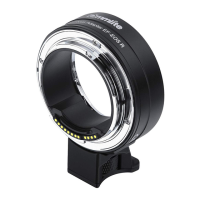

 To Next Page