EasyManua.ls Logo

Commodore 1084S - Radio and Television Interference

Commodore 1084S
59 pages
Print Icon
To Next Page IconTo Next Page
To Previous Page IconTo Previous Page
Loading...
CO
#
a
@
^
*.CV8S
POWER
o
H.CENTERNG
o
WOGHTNesS
O
CONTRAST
o
COLOR
O
D
VOLUME
A.RG6
©
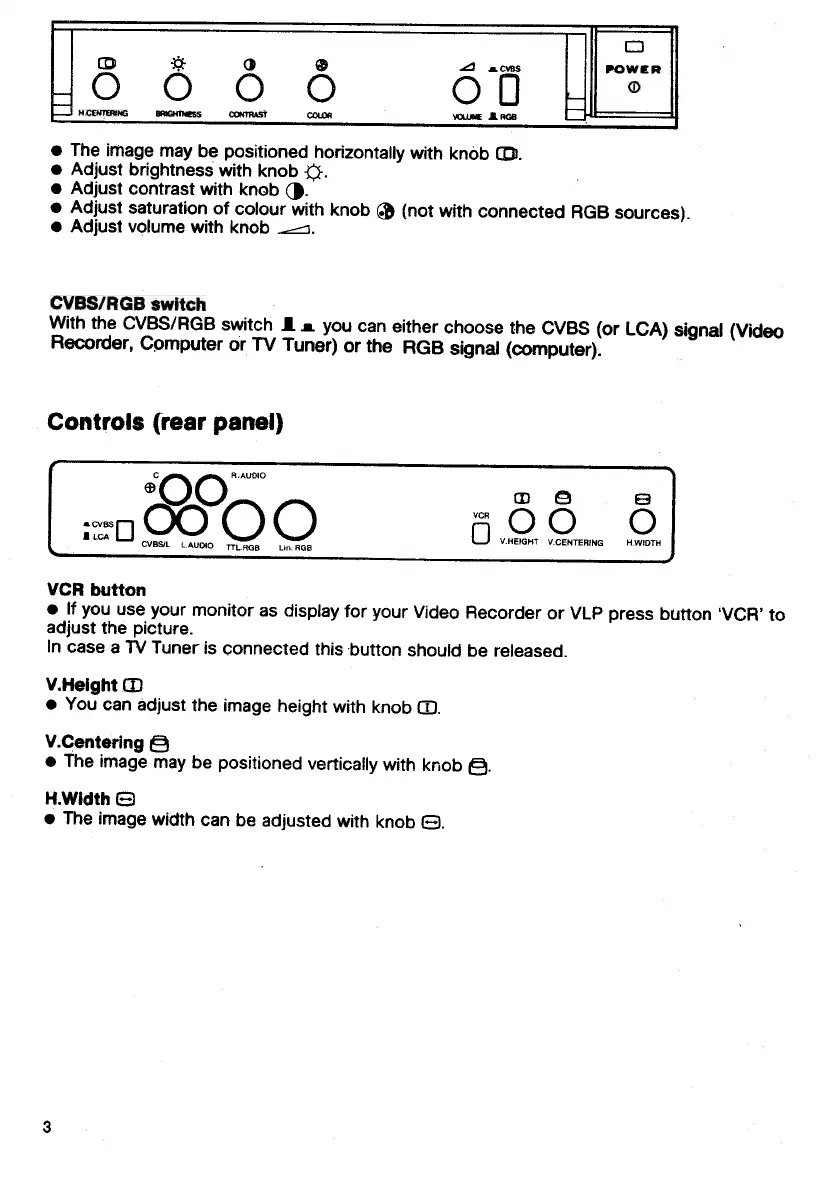
The
image
may
be
positioned
horizontally
with
knob
CD.
Adjust
brightness
with
knob
<j.
Adjust
contrast
with
knob
(J.
Adjust
saturation
of
colour
with
knob
®
(not
with
connected
RGB
sources)
Adjust
volume
with
knob
^--i
CVBS/RGB
switch
With
the
CVBS/RGB
switch
J.
m.
you
can
either
choose
the
CVBS
(or
LCA)
signal
(Video
Recorder,
Computer
or
TV
Tuner)
or
the
RGB
signal
(computer).
Controls
{rear
panel)
C
^^
^^
R.
AUDIO
CVBS/L
L
AUDIO
TTLRQB
Lin.
BOB
CD
Q
B
raOO
o
V.HEIQHT
V.CENTERING
H.WIDTM
0
VCR
button
If
you
use
your
monitor
as
display
for
your
Video
Recorder
or
VLP
press
button
'VCR'
to
adjust
the
picture.
In
case
a
TV
Tuner
is
connected
this
button
should
be
released.
V.HeightCD
You
can
adjust
the
image
height
with
knob
CD.
V.Centering
Q
The
image
may
be
positioned
vertically
with
knob
Q.
KWidth
B
The
image
width
can
be
adjusted
with
knob
O.

Other manuals for Commodore 1084S

Related product manuals