EasyManua.ls Logo

Commodore RF512C - Page 47

Commodore RF512C
52 pages
Print Icon
To Next Page IconTo Next Page
To Previous Page IconTo Previous Page
Loading...
41
Me
thod
II
:
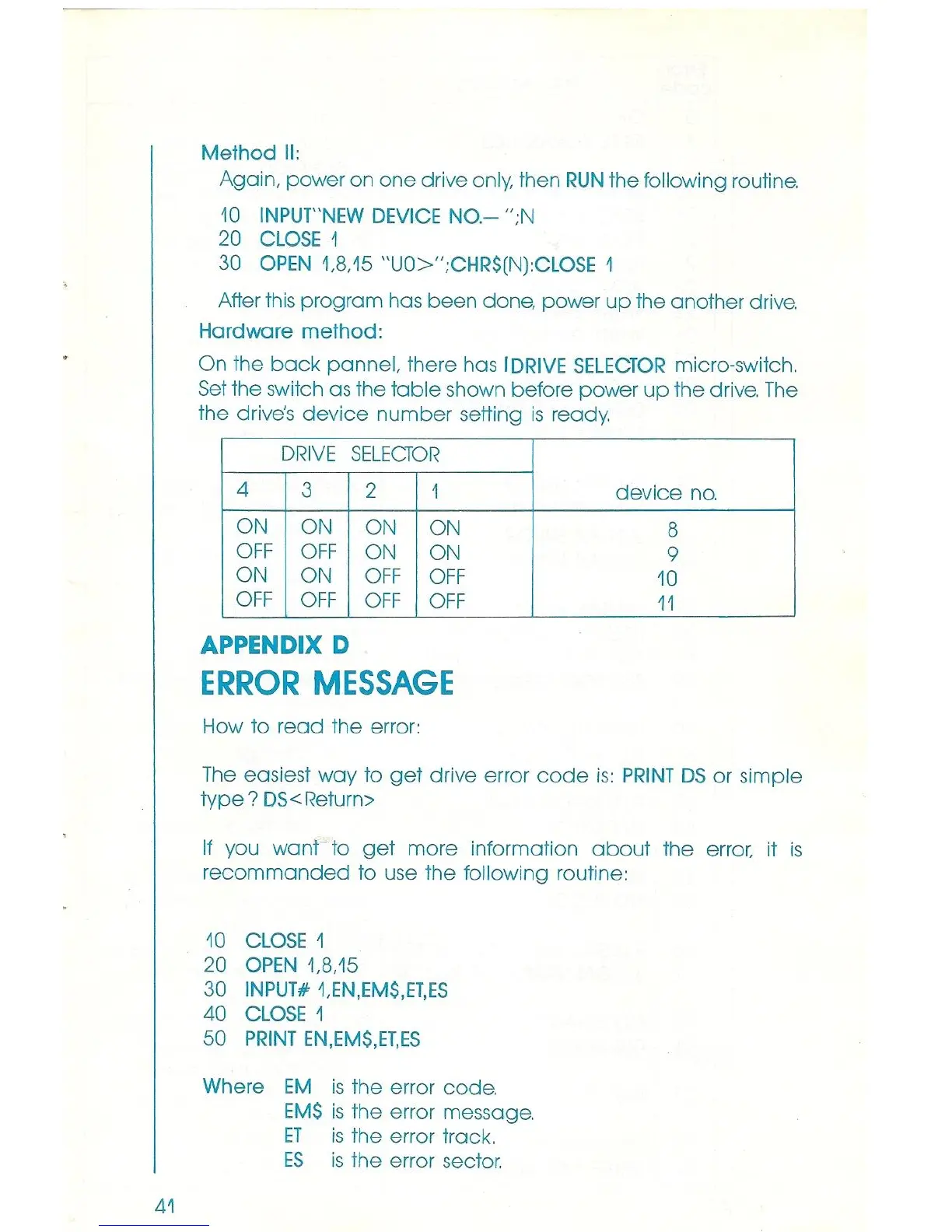
Again, power on
one
drive
only,
then
RUN
the followi
ng
rout
ine.
10
INPUT
"
NEW
DEVI
CE NO - "
;N
20
C
LO
SE 1
30
OPEN
1,8
,
15
"UO>" ;C
HR$
(N):C
LO
SE
1
A
ft
er t
hi
s program has been done, power
up
the another drive.
Hardware
method
:
On the
back
pa
nnel, there has
IDRIVE
S
ELECTOR
micro-switch.
Se
t the
sw
i
tc
h as the
table
shown
be
fore power
up
the
dr
ive.
The
t
he
dri
ve's
device
number
setting
is
ready.
DRIVE
SELEcrOR
4
3 2
1
ON
ON
ON
ON
OFF OFF
ON
ON
ON
ON
OFF
OFF
OFF
OFF
OF
F
OFF
APPENDIX D
ERROR
MESSAGE
H
ow
to r
ead
the error:
device
no.
8
9
10
11
The
easiest
way
to
get
drive error
code
is
:
PRINT
DS or si
mple
type?
DS
<Return>
If
you want to
ge
t more information
about
the error, it
is
r
ecomma
nd
ed
to use t
he
fo
ll
ow
i
ng
routine:
10
C
LO
SE
1
20
OPEN
1.8,
15
30
INPUTii'
1,
EN
,
EM$
,
ET
,
ES
40
CLOSE
1
50
PRINT
EN,
EM$
,
ET
,ES
Wh
ere
EM
is the error code.
EM$
is the error message.
ET
is
the error track.
ES
is t
he
error sector.