EasyManua.ls Logo

Commodore VIC-20 - Page 54

Commodore VIC-20
308 pages
Print Icon
To Next Page IconTo Next Page

To Previous Page IconTo Previous Page
Loading...
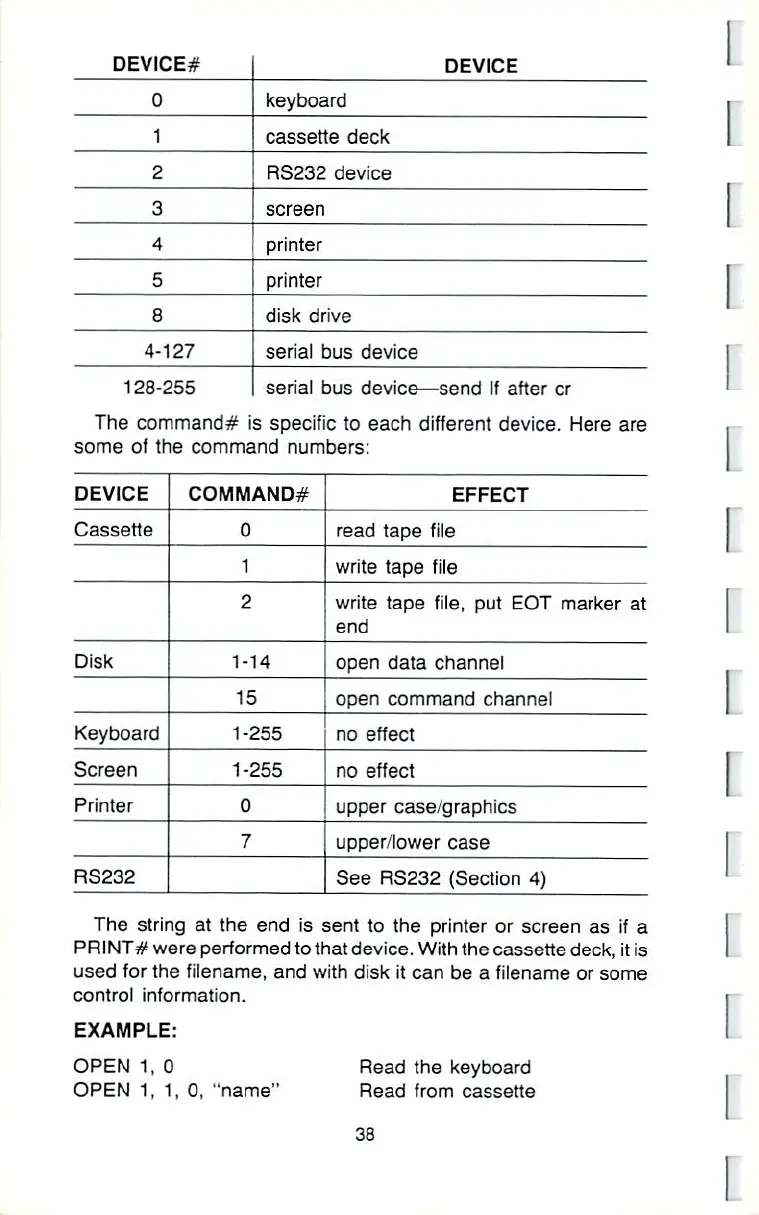
DEVICE#
0
1
2
3
4
5
8
4-127
126-255
DEVICE
keyboard
cassette
deck
RS232
device
screen
printer
printer
disk
drive
serial
bus
device
serial
bus
device—send
If
after
cr
I
I
The
command*
is
specific
to
each
different
device.
Here
are
some
of
the
command
numbers:
DEVICE
Cassette
Disk
Keyboard
Screen
Printer
RS232
COMMAND#
0
1
2
1-14
15
1-255
1-255
0
7
EFFECT
read
tape
file
write
tape
file
write
tape
file,
put
EOT
marker
at
end
open
data
channel
open
command
channel
no
effect
no
effect
upper
case/graphics
upper/lower
case
See
RS232
(Section
4)
The
string at
the
end
is
sent
to
the
printer
or
screen as
if
a
PRINTS
were
performed
toihat
device.
With
the cassette deck,
it
is
used
for
the filename,
and
with
disk
it
can
be
a
filename
or
some
control
information.
EXAMPLE;
OPEN
1t
0
OPEN
1,
1,
0,
â– name"
Read
the
keyboard
Read
from
cassette
33
I
I