ComNav 1101 Autopilot5 - 14 GETTING STARTED
However, if the North/South or East/West correction shown on the
display is greater than 30, then the last display will not come up.
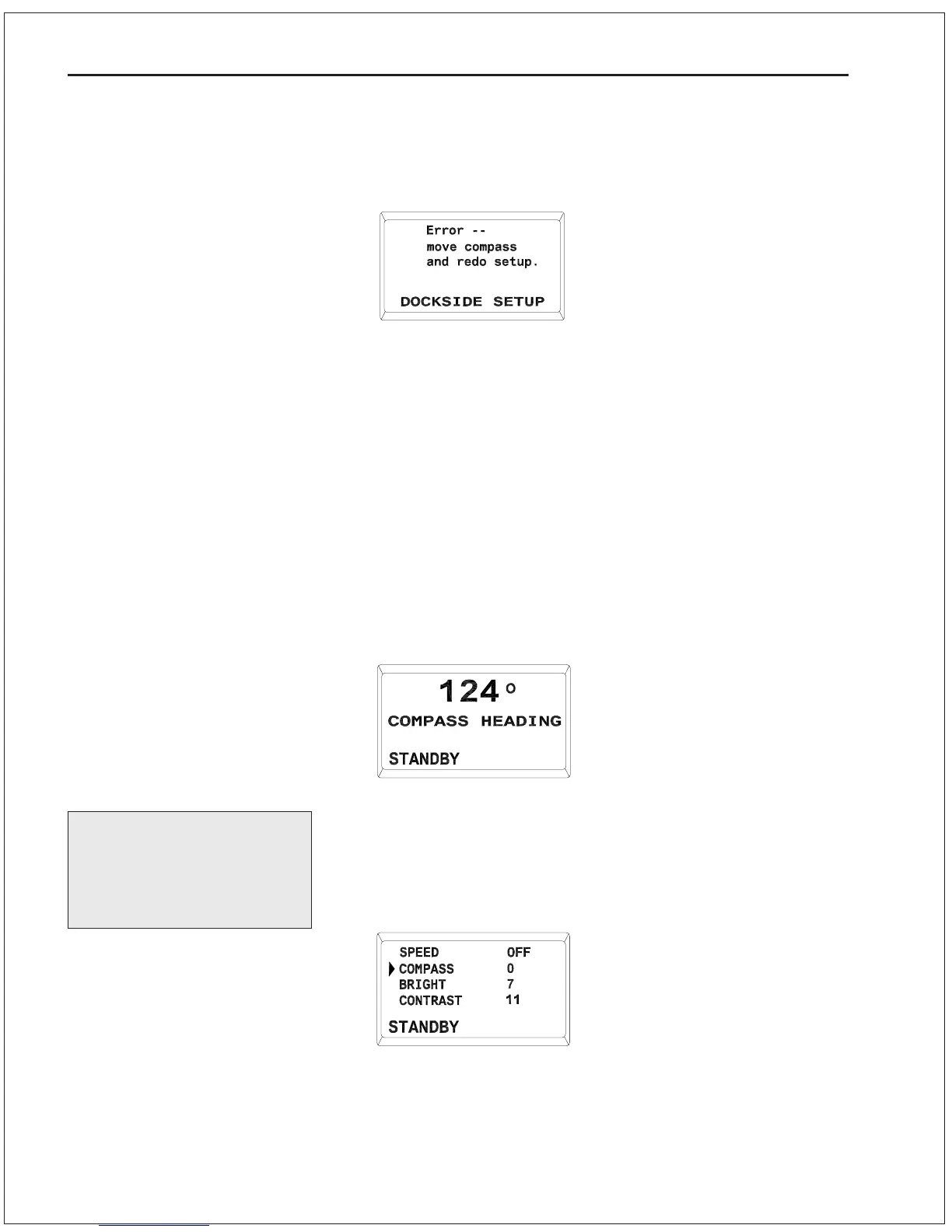
Instead you will see this:
If this display occurs, the Autopilot was not able to auto-compensate
the fluxgate compass. Turn the Autopilot off and move the compass
to a better location (away from ferrous metal, audio speakers etc).
Repeat steps 1 through 8, above. If after several attempts you are
still not able to auto-compensate the Fluxgate Compass, contact
your ComNav dealer or the factory for assistance.
Compass Readout
The next thing to do when setting up the Autopilot is to synchronize
the compass readout to match the vessels steering compass.
1. Put the Autopilot in STANDBY mode.
Skip this procedure if you
do not have another
compass aboard your
vessel.
2. Note the difference (in degrees) between the Autopilot display
and the heading indicated by your vessels steering compass.
3. Double-press the STBY/OFF button and the display will come up
with the Standby menu as shown:
4. Use the ADJUSTMENT KNOB to move the cursor until it is
pointing at Compass, and then press the STBY/OFF button
once.



 To Next Page