Hardware Set-up and Driver Installation
Once you have successfully completed the installation process, you are ready to
connect your hardware and configure it for use. Begin by connecting the “D” shaped
end of the provided USB cable to the ScanShell 800 and the other end to an available
USB port on your computer.
NOTE: DO NOT CONNECT THE SCANNER TO A USB KEYBOARD OR OTHER HUB.
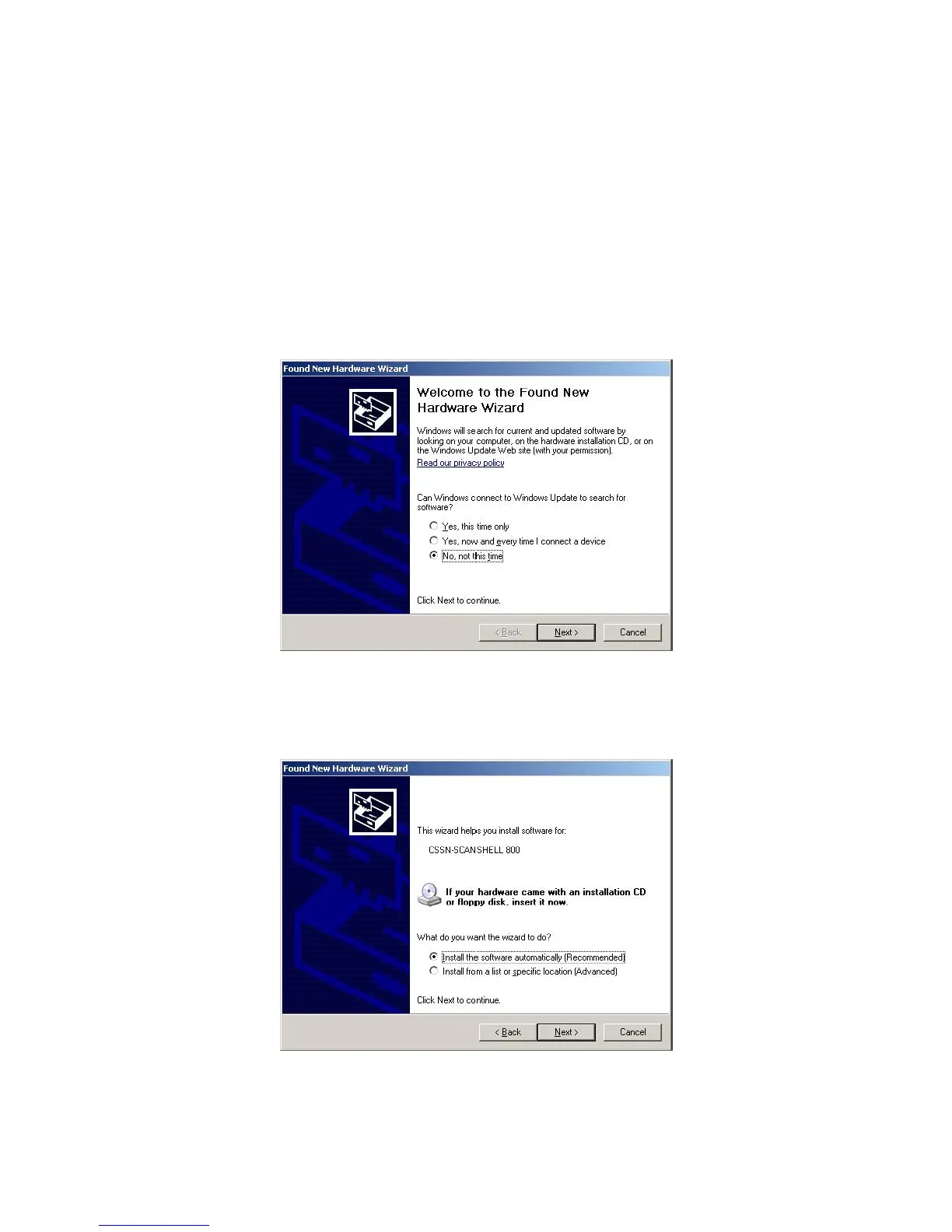
After attaching your scanner, you will be greeted with the Found New Hardware
Wizard. When asked whether Windows can connect to Windows Update to search for
your software, select No, not this time and click Next (Image 11).
Image 11
Select to Install the software automatically (Recommended) and then click Next
(Image 12).
Image 12
IG0069.2 — V6450 Driver’s License Optical Scanner Page 7 of 16


 To Next Page