♦♦♦
8 - English
English
CONTROLS AND ADJUSTMENTS
Controls and Adjustments
Once you have installed the monitor for your system, please read the instructions in
this section which give you some guidelines on how to use the monitor more
efficiently. It leads you through the various functions of the user controls and
explains how to adjust the monitor to your personal preference.
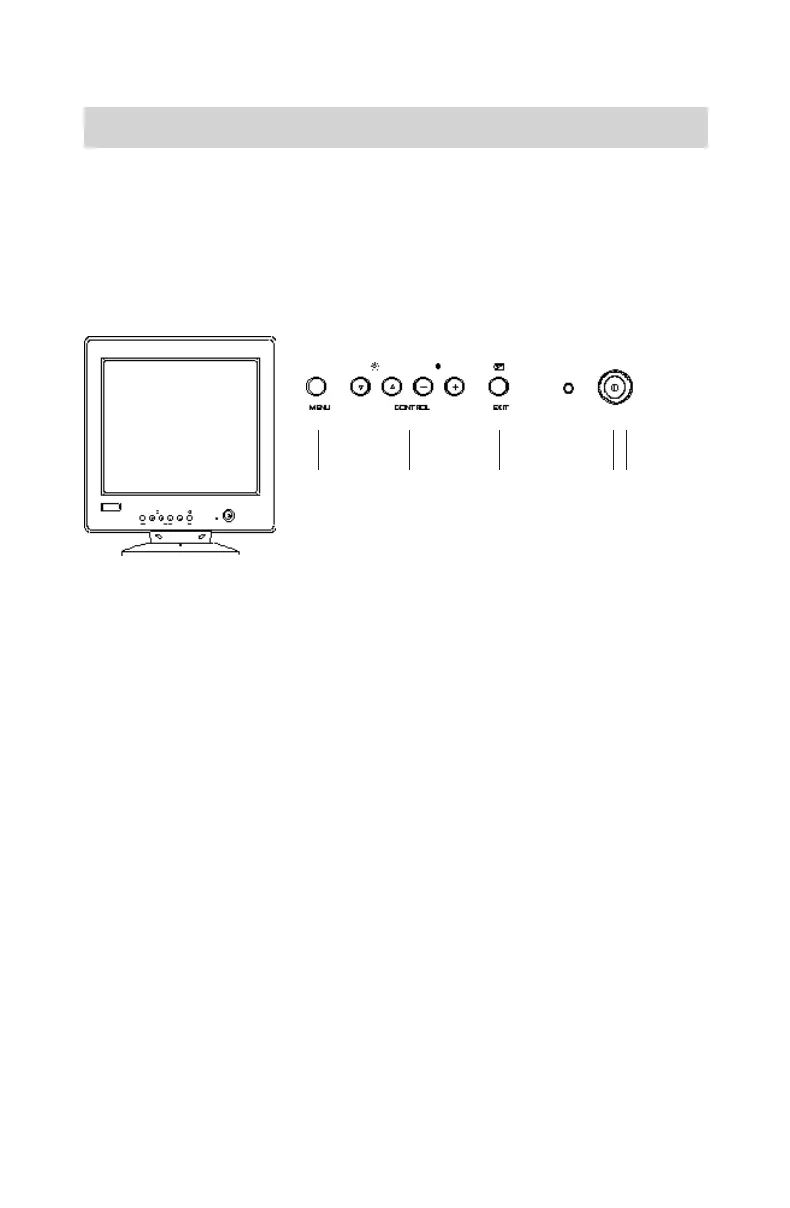
Front User Controls
5
321
4
1. MENU KEY
Displays and selects the "Status," "Position," "Size," "Geometry," "Moire,"
"Color," and "Language" functions.
2. CONTROL KEYS
•Adjusts the parameter of the selected function.
•Adjusts the contrast or brightness level of the screen.
3. EXIT/DEGAUSS SWITCH
Exits OSD window or manually degausses the monitor.
4. POWER LED INDICATOR
As long as the monitor is powered, this indicator is lit. In normal operation, it
lights green. While in power saving mode, the indicator will turn to amber.
5. POWER SWITCH
Turns the monitor On and Off.
Power Save Note: This monitor is equipped with automatic power-
saving circuitry design that will work with any computer following the
VESA DPMS detection format, and it meets ENERGY STAR low power
state definition. When the monitor is first powered on, the power save
function remains inactive; the power save function is triggered when the
input signal is cut off by the computer or there is a loss of signal input.
1Bk-en.p65 7/27/98, 3:04 PM8


 To Next Page