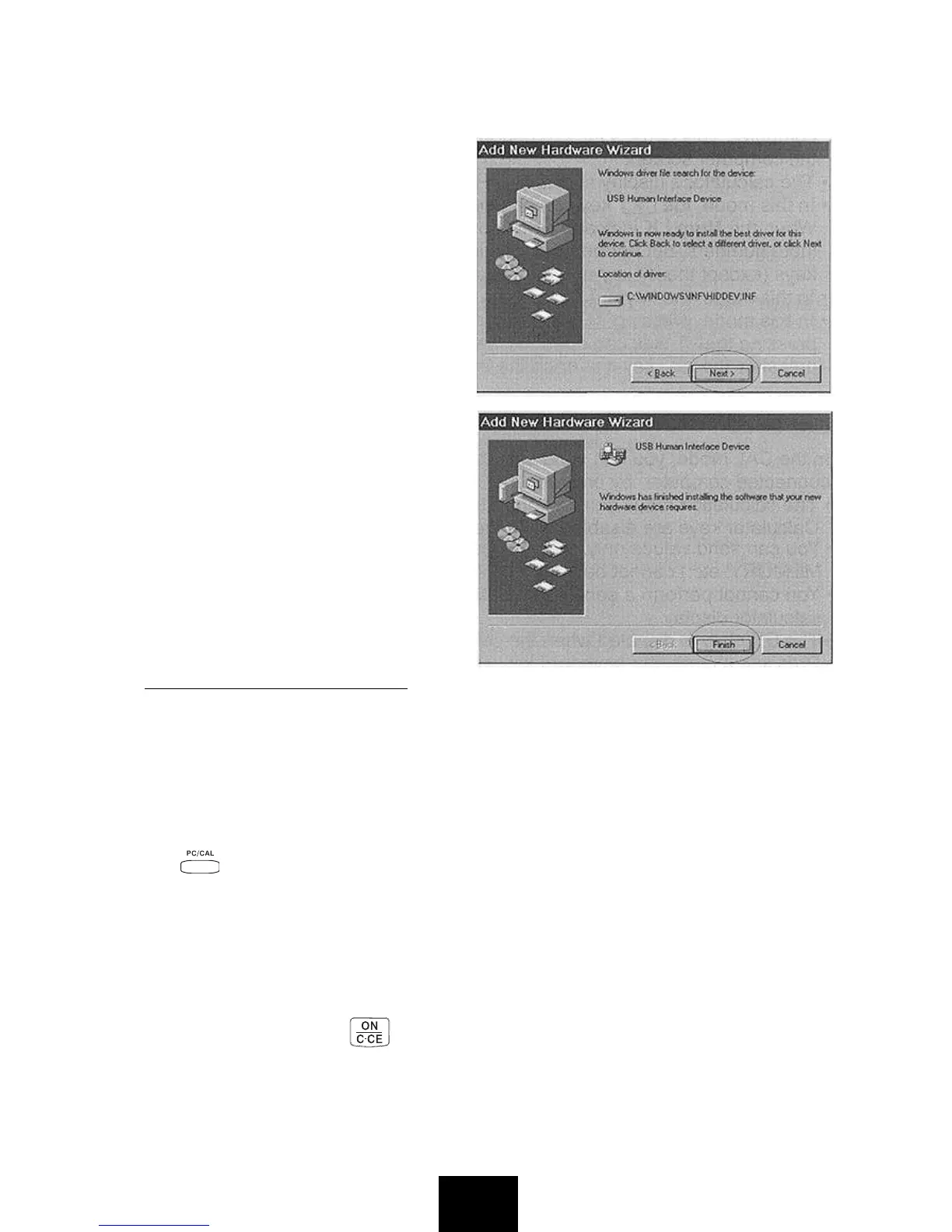
3. You do not have to perform the [Specify a location] operation. Click
[
Next] to start the search for the driver.
Important!
If the USB driver is not located
on your computer's hard disk,
the installer will ask you for the
Windows
®
98 CD-ROM. Place
the CD-ROM into your
computer's drive, and then click
[
OK].
4. Click [
Next]. This starts actual
installation of the USB driver.
5. Click [
Finish].
• Windows
®
is a registered trademark
of Microsoft
®
Corporation in the
United States and other countries.
CAL MODE AND PC MODE
This calculator has two modes: a CAL mode and a PC mode.
The CAL mode is entered automatically whenever the calculator is not
connected to a computer with the USB cable. If the calculator is in the PC
mode when it is not connected, pressing any key causes it to enter the CAL
mode.
While the calculator is connected to a computer with the USB cable, pressing
the key toggles between the CAL mode and PC mode.
CAL Mode
• The calculator performs normal calculator operations.
• In this mode, you can send calculation results (display contents) to a
computer when the
Num LK indicator light is on.
• When an overflow error occurs, the overflow error sign “ERROR” appears
on the display. Press to reset.
E4


 To Next Page